4.05 Remote Printing
The remote printing feature is only supported on Windows 7 and later.
Remote Printing Function
During remote control, you can print documents, images, and other files from the remote device directly to your local (controller) printer. This eliminates the need to transfer files, saving storage space.
How to Use Remote Printing?
Before using remote printing, install the driver on the controlled device:
Go to Security Settings → Remote Printing → Install Remote Printer Driver
Note: Administrator privileges are required for installation.

When printing from the remote device, choose "Deskin Printer" as the printer.
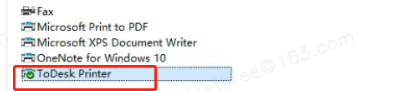
Your controller device will receive a printing notification, and a “Remote Printing” prompt will appear. Select your local printer and proceed with printing.
Remote Printing Now is complete.


