ประสิทธิภาพ
ประสิทธิภาพ
·
5 นาที
·
5 นาที
เคนจิ มาเอดะ (แปลโดย DeskIn)
Published on
Updated on
Updated on
หลังจากฤดูหนาวที่โหดร้ายพร้อมหิมะตกหนักเป็นประวัติการณ์ตามแนวทะเลญี่ปุ่น แสงแดดในฤดูใบไม้ผลิกำลังเริ่มอุ่นขึ้น สำหรับบัณฑิตใหม่ที่เพิ่งจบการศึกษาไม่ว่าจะจากมัธยมหรือมหาวิทยาลัย ฤดูกาลนี้นำมาซึ่งความตื่นเต้นและความไม่แน่นอนผสมกัน
หากคุณเคยคิดว่า “ฉันทิ้งไฟล์สำคัญไว้ในคอมพิวเตอร์ที่บ้าน” หรือจำเป็นต้องเข้าถึงคอมพิวเตอร์ที่ทำงานของคุณในวันทำงานจากระยะไกล เครื่องมือเดสก์ท็อประยะไกลสามารถช่วยคุณได้ ในบทความนี้ เราขอแนะนำ DeskIn ซึ่งเป็นโซลูชั่นเดสก์ท็อประยะไกลชั้นนำ และอธิบายวิธีการใช้งานที่เป็นประโยชน์ที่สามารถช่วยพนักงานใหม่ทำงานได้อย่างชาญฉลาด เชื่อมต่อไว้ และจัดการงานได้อย่างมีประสิทธิภาพ
การเข้าถึงเดสก์ท็อประยะไกลช่วยให้คุณเชื่อมต่อและควบคุมคอมพิวเตอร์ส่วนตัวของคุณได้จากทุกที่ด้วยอุปกรณ์เคลื่อนที่ แท็บเล็ต หรือเครื่องพีซีอื่น มันให้ประสบการณ์เสมือนคุณนั่งอยู่หน้าคอมพิวเตอร์ที่บ้านหรือที่ทำงานของคุณ แม้ว่าเราจะอยู่ห่างออกไปหลายไมล์
ในขณะที่มัน คล้ายกับการประมวลผลบนคลาวด์ ในการให้คุณเข้าถึงได้ทุกที่ เดสก์ท็อประยะไกลมุ่งเน้นที่อุปกรณ์ของคุณเองมากกว่าการ "ยืม" ทรัพยากรจากเซิร์ฟเวอร์ของบุคคลที่สาม ซึ่งจะช่วยให้คุณควบคุมไฟล์ โปรแกรม และสภาพแวดล้อมการทำงานได้อย่างเต็มที่
เปรียบเทียบการเข้าถึงเดสก์ท็อประยะไกลกับการประมวลผลบนคลาวด์: เครื่องมือใดดีกว่า
1. เข้าถึงไฟล์ที่ไม่ถูกเก็บในคลาวด์สตอเรจ
แม้ว่าการจัดเก็บข้อมูลในคลาวด์จะเป็นที่แพร่หลายมากขึ้น แต่เอกสารที่ละเอียดอ่อน ไฟล์สื่อขนาดใหญ่ และข้อมูลส่วนตัวมักถูกเก็บไว้ในอุปกรณ์ส่วนตัว เดสก์ท็อประยะไกลช่วยให้คุณเข้าถึงไฟล์เหล่านั้นได้อย่างปลอดภัยจากสำนักงาน คาเฟ่ หรือบ้าน โดยไม่ต้องเสี่ยงต่อความเป็นส่วนตัว
2. การทำงานทางไกลและการทำงานทางผ่านหลายสถานที่
ไม่ว่าคุณจะทำงานจากที่บ้าน เยี่ยมลูกค้า หรือย้ายไปยังหลายสถานที่ DeskIn ช่วยให้คุณทำงานได้อย่างไม่สะดุด พนักงานที่ทำงานประจำสำนักงานยังสามารถเข้าถึงคอมพิวเตอร์ในออฟฟิศจากระยะไกล เพื่อให้มั่นใจถึงการทำงานร่วมกันอย่างราบรื่นและประสิทธิภาพไม่หยุดยั้ง
3. บริการลูกค้าและการช่วยเหลือทางเทคนิค
เดสก์ท็อประยะไกลทำให้การแก้ปัญหาโปรแกรม การกำหนดค่าต่าง ๆ หรือการแนะนำผู้ใช้โดยตรงบนพีซีของพวกเขาเป็นเรื่องง่าย
DeskIn ยังอนุญาตให้เข้าถึงอุปกรณ์เคลื่อนที่ระยะไกล รวมถึง iPhone และ Android ทำให้เหมาะสำหรับการสนับสนุนทางเทคนิคหรือการแก้ไขปัญหาแอปพลิเคชันมือถือ
4. การเข้าถึงแอปพลิเคชันที่สำคัญทางธุรกิจอย่างรวดเร็ว
DeskIn มอบการเข้าถึงซอฟต์แวร์ที่เชื่อถือได้และมีความหน่วงต่ำ เช่น โปรแกรมสำหรับงานสเปรดชีต เครื่องมือออกแบบ หรือโปรแกรมตัดต่อวิดีโอ ซึ่งช่วยให้พนักงานใหม่สามารถทำงานให้เสร็จภายในกำหนดเวลาได้อย่างมีประสิทธิภาพ
5. ความร่วมมือในทีมและการแชร์ไฟล์
แชร์ไฟล์ขนาดใหญ่ ทำงานโครงการร่วมกัน หรือตรวจสอบการนำเสนอในเรียลไทม์ การสตรีมคุณภาพสูงช่วยให้การดูวิดีโอและภาพหรือสื่ออื่น ๆ เป็นไปอย่างราบรื่นโดยไม่เกิดความล่าช้าหรือบิดเบือน
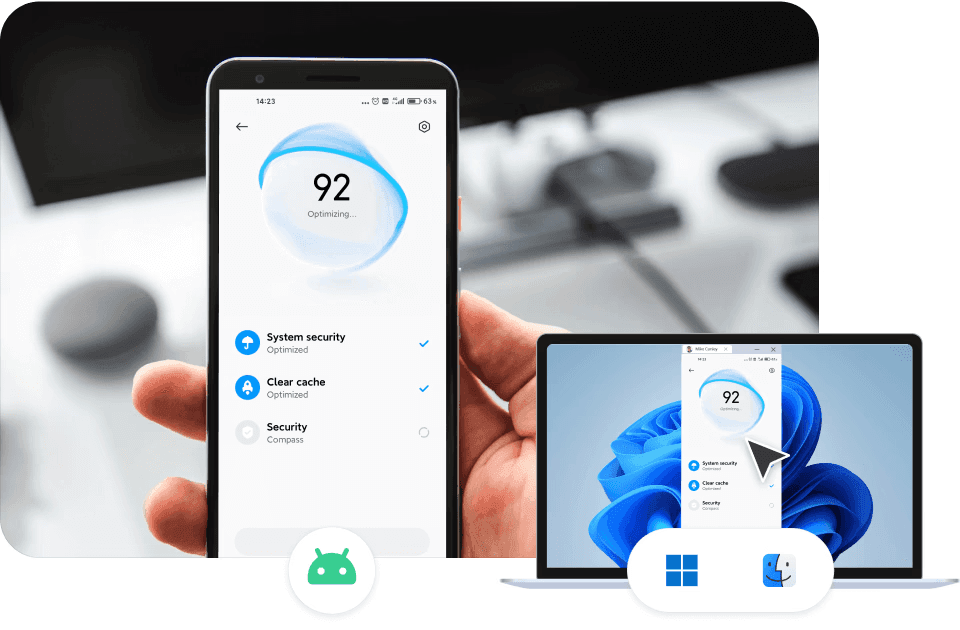
DeskIn เป็นเดสก์ท็อประยะไกลที่มีความเร็วสูงและความปลอดภัยสูง ออกแบบมาเพื่อให้ประสิทธิภาพเชื่อถือได้โดยมีความล่าช้าน้อยที่สุด ไม่เหมือนเดสก์ท็อประยะไกลอื่น ๆ ที่อาจมีปัญหาความหน่วงหรือกังวลเรื่องความปลอดภัย DeskIn มอบ:
การสตรีมที่ความเร็วสูง
การควบคุมในเวลาจริง
คุณสมบัติความเป็นส่วนตัวที่แข็งแกร่ง
ความปลอดภัยระดับองค์กร
การติดตั้งและการตั้งค่าเข้าใจได้ง่าย ดังนั้นคุณสามารถเริ่มต้นใช้งานได้ทันที
สำหรับการเริ่มต้นการเข้าถึงเดสก์ท็อประยะไกล เราขอแนะนำ DeskIn อย่างสูง ซึ่งเป็นแอพพลิเคชั่นเดสก์ท็อประยะไกลชั้นนำด้วยความเร็วสูงและความปลอดภัยสูง แม้ว่าเดสก์ท็อประยะไกลอื่น ๆ มักประสบปัญหาความหน่วงหรือความกังวลเรื่องความปลอดภัย DeskIn ได้รับการออกแบบมาเพื่อเพิ่มประสิทธิภาพของการเข้าถึงเดสก์ท็อประยะไกลอย่างสูงสุด ด้วยการสตรีมที่ความเร็วสูง การควบคุมในเวลาจริง และคุณสมบัติความเป็นส่วนตัวที่แข็งแกร่ง ด้วยมาตรฐานความปลอดภัยระดับองค์กร คุณสามารถใช้งานได้อย่างมั่นใจเพื่อวัตถุประสงค์ทางธุรกิจ
การติดตั้ง และการใช้งานจริงได้รับการออกแบบให้เข้าใจง่าย ช่วยให้คุณสร้างสภาพแวดล้อมเดสก์ท็อประยะไกลได้ทันทีหลังการติดตั้ง
ประโยชน์ 9 ประการของการเข้าถึงระยะไกล & แนวปฏิบัติที่ดีที่สุดสำหรับชีวิตสมัยใหม่
เมื่อฤดูใบไม้ผลิมาถึง มืออาชีพใหม่สามารถเริ่มต้นอาชีพด้วยความมั่นใจโดยใช้เครื่องมือที่เหมาะสม การเข้าถึงเดสก์ท็อประยะไกลกลายเป็นสิ่งที่มีค่าสำหรับเมื่อไฟล์สำคัญ ภาพ หรือการออกแบบถูกเก็บไว้ในคอมพิวเตอร์ที่บ้านหรือที่ทำงาน
นอกจากนี้ยังสนับสนุนการจัดการการทำงานที่ยืดหยุ่น การร่วมงานภายในทีม และการใช้งานส่วนบุคคล เช่น การเล่นเกมระยะไกลและการทำโปรเจ็กต์สร้างสรรค์ สำหรับพนักงานใหม่ DeskIn เป็นมากกว่าเพียงแค่ยูทิลิตี้ แต่เป็นเครื่องมือที่เชื่อถือได้เพื่อให้การรักษาประสิทธิภาพ ความเชื่อมโยง และความพร้อมในการรับมือกับทุกสถานการณ์
DeskIn เป็นโซลูชั่นเดสก์ท็อประยะไกลสำหรับมืออาชีพใหม่ในญี่ปุ่น ที่รวมความเร็ว ความปลอดภัย และความง่ายในการใช้งานเพื่อสนับสนุนวิถีการทำงานที่ทันสมัยได้ยินดีและมีประสิทธิภาพ

หลังจากฤดูหนาวที่โหดร้ายพร้อมหิมะตกหนักเป็นประวัติการณ์ตามแนวทะเลญี่ปุ่น แสงแดดในฤดูใบไม้ผลิกำลังเริ่มอุ่นขึ้น สำหรับบัณฑิตใหม่ที่เพิ่งจบการศึกษาไม่ว่าจะจากมัธยมหรือมหาวิทยาลัย ฤดูกาลนี้นำมาซึ่งความตื่นเต้นและความไม่แน่นอนผสมกัน
หากคุณเคยคิดว่า “ฉันทิ้งไฟล์สำคัญไว้ในคอมพิวเตอร์ที่บ้าน” หรือจำเป็นต้องเข้าถึงคอมพิวเตอร์ที่ทำงานของคุณในวันทำงานจากระยะไกล เครื่องมือเดสก์ท็อประยะไกลสามารถช่วยคุณได้ ในบทความนี้ เราขอแนะนำ DeskIn ซึ่งเป็นโซลูชั่นเดสก์ท็อประยะไกลชั้นนำ และอธิบายวิธีการใช้งานที่เป็นประโยชน์ที่สามารถช่วยพนักงานใหม่ทำงานได้อย่างชาญฉลาด เชื่อมต่อไว้ และจัดการงานได้อย่างมีประสิทธิภาพ
การเข้าถึงเดสก์ท็อประยะไกลช่วยให้คุณเชื่อมต่อและควบคุมคอมพิวเตอร์ส่วนตัวของคุณได้จากทุกที่ด้วยอุปกรณ์เคลื่อนที่ แท็บเล็ต หรือเครื่องพีซีอื่น มันให้ประสบการณ์เสมือนคุณนั่งอยู่หน้าคอมพิวเตอร์ที่บ้านหรือที่ทำงานของคุณ แม้ว่าเราจะอยู่ห่างออกไปหลายไมล์
ในขณะที่มัน คล้ายกับการประมวลผลบนคลาวด์ ในการให้คุณเข้าถึงได้ทุกที่ เดสก์ท็อประยะไกลมุ่งเน้นที่อุปกรณ์ของคุณเองมากกว่าการ "ยืม" ทรัพยากรจากเซิร์ฟเวอร์ของบุคคลที่สาม ซึ่งจะช่วยให้คุณควบคุมไฟล์ โปรแกรม และสภาพแวดล้อมการทำงานได้อย่างเต็มที่
เปรียบเทียบการเข้าถึงเดสก์ท็อประยะไกลกับการประมวลผลบนคลาวด์: เครื่องมือใดดีกว่า
1. เข้าถึงไฟล์ที่ไม่ถูกเก็บในคลาวด์สตอเรจ
แม้ว่าการจัดเก็บข้อมูลในคลาวด์จะเป็นที่แพร่หลายมากขึ้น แต่เอกสารที่ละเอียดอ่อน ไฟล์สื่อขนาดใหญ่ และข้อมูลส่วนตัวมักถูกเก็บไว้ในอุปกรณ์ส่วนตัว เดสก์ท็อประยะไกลช่วยให้คุณเข้าถึงไฟล์เหล่านั้นได้อย่างปลอดภัยจากสำนักงาน คาเฟ่ หรือบ้าน โดยไม่ต้องเสี่ยงต่อความเป็นส่วนตัว
2. การทำงานทางไกลและการทำงานทางผ่านหลายสถานที่
ไม่ว่าคุณจะทำงานจากที่บ้าน เยี่ยมลูกค้า หรือย้ายไปยังหลายสถานที่ DeskIn ช่วยให้คุณทำงานได้อย่างไม่สะดุด พนักงานที่ทำงานประจำสำนักงานยังสามารถเข้าถึงคอมพิวเตอร์ในออฟฟิศจากระยะไกล เพื่อให้มั่นใจถึงการทำงานร่วมกันอย่างราบรื่นและประสิทธิภาพไม่หยุดยั้ง
3. บริการลูกค้าและการช่วยเหลือทางเทคนิค
เดสก์ท็อประยะไกลทำให้การแก้ปัญหาโปรแกรม การกำหนดค่าต่าง ๆ หรือการแนะนำผู้ใช้โดยตรงบนพีซีของพวกเขาเป็นเรื่องง่าย
DeskIn ยังอนุญาตให้เข้าถึงอุปกรณ์เคลื่อนที่ระยะไกล รวมถึง iPhone และ Android ทำให้เหมาะสำหรับการสนับสนุนทางเทคนิคหรือการแก้ไขปัญหาแอปพลิเคชันมือถือ
4. การเข้าถึงแอปพลิเคชันที่สำคัญทางธุรกิจอย่างรวดเร็ว
DeskIn มอบการเข้าถึงซอฟต์แวร์ที่เชื่อถือได้และมีความหน่วงต่ำ เช่น โปรแกรมสำหรับงานสเปรดชีต เครื่องมือออกแบบ หรือโปรแกรมตัดต่อวิดีโอ ซึ่งช่วยให้พนักงานใหม่สามารถทำงานให้เสร็จภายในกำหนดเวลาได้อย่างมีประสิทธิภาพ
5. ความร่วมมือในทีมและการแชร์ไฟล์
แชร์ไฟล์ขนาดใหญ่ ทำงานโครงการร่วมกัน หรือตรวจสอบการนำเสนอในเรียลไทม์ การสตรีมคุณภาพสูงช่วยให้การดูวิดีโอและภาพหรือสื่ออื่น ๆ เป็นไปอย่างราบรื่นโดยไม่เกิดความล่าช้าหรือบิดเบือน
DeskIn เป็นเดสก์ท็อประยะไกลที่มีความเร็วสูงและความปลอดภัยสูง ออกแบบมาเพื่อให้ประสิทธิภาพเชื่อถือได้โดยมีความล่าช้าน้อยที่สุด ไม่เหมือนเดสก์ท็อประยะไกลอื่น ๆ ที่อาจมีปัญหาความหน่วงหรือกังวลเรื่องความปลอดภัย DeskIn มอบ:
การสตรีมที่ความเร็วสูง
การควบคุมในเวลาจริง
คุณสมบัติความเป็นส่วนตัวที่แข็งแกร่ง
ความปลอดภัยระดับองค์กร
การติดตั้งและการตั้งค่าเข้าใจได้ง่าย ดังนั้นคุณสามารถเริ่มต้นใช้งานได้ทันที
สำหรับการเริ่มต้นการเข้าถึงเดสก์ท็อประยะไกล เราขอแนะนำ DeskIn อย่างสูง ซึ่งเป็นแอพพลิเคชั่นเดสก์ท็อประยะไกลชั้นนำด้วยความเร็วสูงและความปลอดภัยสูง แม้ว่าเดสก์ท็อประยะไกลอื่น ๆ มักประสบปัญหาความหน่วงหรือความกังวลเรื่องความปลอดภัย DeskIn ได้รับการออกแบบมาเพื่อเพิ่มประสิทธิภาพของการเข้าถึงเดสก์ท็อประยะไกลอย่างสูงสุด ด้วยการสตรีมที่ความเร็วสูง การควบคุมในเวลาจริง และคุณสมบัติความเป็นส่วนตัวที่แข็งแกร่ง ด้วยมาตรฐานความปลอดภัยระดับองค์กร คุณสามารถใช้งานได้อย่างมั่นใจเพื่อวัตถุประสงค์ทางธุรกิจ
การติดตั้ง และการใช้งานจริงได้รับการออกแบบให้เข้าใจง่าย ช่วยให้คุณสร้างสภาพแวดล้อมเดสก์ท็อประยะไกลได้ทันทีหลังการติดตั้ง
ประโยชน์ 9 ประการของการเข้าถึงระยะไกล & แนวปฏิบัติที่ดีที่สุดสำหรับชีวิตสมัยใหม่
เมื่อฤดูใบไม้ผลิมาถึง มืออาชีพใหม่สามารถเริ่มต้นอาชีพด้วยความมั่นใจโดยใช้เครื่องมือที่เหมาะสม การเข้าถึงเดสก์ท็อประยะไกลกลายเป็นสิ่งที่มีค่าสำหรับเมื่อไฟล์สำคัญ ภาพ หรือการออกแบบถูกเก็บไว้ในคอมพิวเตอร์ที่บ้านหรือที่ทำงาน
นอกจากนี้ยังสนับสนุนการจัดการการทำงานที่ยืดหยุ่น การร่วมงานภายในทีม และการใช้งานส่วนบุคคล เช่น การเล่นเกมระยะไกลและการทำโปรเจ็กต์สร้างสรรค์ สำหรับพนักงานใหม่ DeskIn เป็นมากกว่าเพียงแค่ยูทิลิตี้ แต่เป็นเครื่องมือที่เชื่อถือได้เพื่อให้การรักษาประสิทธิภาพ ความเชื่อมโยง และความพร้อมในการรับมือกับทุกสถานการณ์
DeskIn เป็นโซลูชั่นเดสก์ท็อประยะไกลสำหรับมืออาชีพใหม่ในญี่ปุ่น ที่รวมความเร็ว ความปลอดภัย และความง่ายในการใช้งานเพื่อสนับสนุนวิถีการทำงานที่ทันสมัยได้ยินดีและมีประสิทธิภาพ


How to Play MapleStory Classic World on Mac
A lot of the players who are most excited about MapleStory Classic World grew up on 2005-era MapleStory — and a large share of that generation now does its computing on a MacBook. Nexon clearly knows this: a native macOS client was on the feature list for the second Closed Online Test, which ran August 4–12, 2026, alongside Ossyria and third job advancement. But as of this writing, that Mac client is still in development, not publicly available, and there's still no confirmed public launch date for the game itself.
So if you want to play MapleStory Classic World on a Mac right now — or want a reliable plan for when the game does launch — you've got two real options: run Windows in a virtual machine, or use DeskIn remote desktop to control an actual Windows PC from your Mac. This guide covers both, including a login-conflict issue that catches a lot of virtual machine users off guard.
Not yet, publicly. Nexon's May 2026 roadmap update confirmed macOS support is in development, and it appeared as a testable feature in the second Closed Online Test. Windows PC remains the confirmed launch platform, and Nexon hasn't said whether the Mac client will be ready at launch or arrive afterward. The game hasn't had a full public release on any platform — Nexon has said one more test is planned before launch.
Given that, Mac players currently have two ways in: a Windows virtual machine, or remote desktop software that connects to a real Windows PC.
Classic World is exclusive to GMS (Global MapleStory), covering North America, Europe, and most other regions without a local Nexon partner. Markets with their own official MapleStory service — Korea, China, Japan, Taiwan/Hong Kong, and Southeast Asia — aren't GMS-eligible, so Mac players in those regions would need a VPN to reach Classic World, which isn't recommended. Whether NA and EU will run as separate worlds hasn't been confirmed.
Tools like Parallels Desktop or VMware Fusion let you run a full Windows install inside macOS, and then install MapleStory Classic World the way a Windows user would. It works, but it asks a lot of your Mac's hardware.
RAM: 16GB minimum recommended; 8GB is genuinely tight, since macOS and Windows are both running at once and macOS alone can eat most of that before Windows gets a share. For a comfortable setup with guides or Discord open on the side, aim for 32GB.
CPU/GPU: Virtual machines can't pass hardware through at 100%; graphics get software-emulated, which typically costs 20–30% of the performance you'd get on native Windows hardware.
Thermals: Running two full operating systems under load generates real heat, and laptop-class Macs with limited cooling can throttle during longer grinding sessions.
Apple Silicon translation overhead: M-series Macs can only run Windows on ARM in a VM. If Classic World ships as an x86/x64 build, it needs an extra translation layer to run at all, stacking on top of the virtualization overhead already mentioned.
Anti-cheat compatibility is a real unknown: the original MapleStory has historically been hostile to virtualized environments because of its anti-cheat system, and Nexon hasn't said how Classic World's anti-cheat will treat VMs. Treat virtualization as a maybe, not a guaranteed plan.
There's also the practical overhead: setting up a VM means downloading a Windows image, allocating dozens of gigabytes of disk space, installing display drivers, and — on Apple Silicon — dealing with ARM compatibility quirks that don't show up on a real x86 PC. Keyboard shortcuts can also conflict, since macOS system shortcuts (Control, Option, Command) don't always play nicely with a Windows game's default keybinds.
Instead of building a Windows environment inside your Mac, DeskIn lets you connect directly to a Windows PC you already have — your desktop at home, a work machine, or a spare laptop — and control it from your Mac in real time. The game runs on genuine Windows hardware the whole time, so there's no emulation tax, no ARM translation layer, and no anti-cheat guessing game.
A virtual machine makes sense if:
You don't have access to any Windows PC at all, so a Mac VM is your only option.
Your Mac has strong specs — 16GB+ RAM, ideally 32GB, and a higher-end M-series chip that can absorb the performance loss.
You're comfortable with a fairly technical setup process.
You rarely need to switch between devices, so the single-login limitation isn't a practical issue for you.
DeskIn makes more sense if:
You already have a Windows PC (or another Mac) that can run MapleStory Classic World, and you just want to reach it from your MacBook.
You're traveling or away from your desk often and want to pick up where you left off without re-downloading anything.
You don't want to deal with logging out of one device every time you switch to another.
Your Mac has more modest specs, and you'd rather not risk stutters, crashes, or a game that won't launch at all.
If you already own a Windows machine, DeskIn is generally the lower-effort, lower-risk choice. A VM is really a fallback for players with no Windows access and a Mac powerful enough to absorb the overhead.
Step 1: Set up the Windows PC. Install MapleStory Classic World on a Windows PC and create your character, then install DeskIn on that same PC, sign in, and enable unattended access with a connection password so you can reach it later without anyone at the keyboard.
Step 2: Install DeskIn on your Mac. Download the macOS version of DeskIn, sign in with the same account, and your Windows PC will appear in your device list.
Step 3: Connect. Select the PC, enter the connection password, and you'll get a live view of the Windows desktop that you control with your Mac's mouse and trackpad — the same session, the same login, no conflicts.
Step 4: Tune quality for your connection. On a stable connection, push quality up to enjoy Classic World's remastered pixel art in full detail; on the road, prioritize smoothness to cut down on input lag.
Step 5: Log in and play. Open the game inside the remote session and log in as usual — grinding, party quests, and shopping all work exactly as they would sitting at the PC directly.
Resolution and quality: Free-tier users should start around 720p/30fps for a stable baseline; paid-tier users can push up to 4K 60FPS or 2K 240FPS on a strong connection to get the most out of Classic World's art.
Screen scaling: If your Mac and Windows PC have very different display sizes, use DeskIn's automatic scaling option in the toolbar, or adjust the remote PC's resolution to match your Mac's screen more closely.
Keyboard and mouse mapping: DeskIn maps your Mac's keyboard directly to the remote PC. Turning on Game Mouse mode prevents the keyboard from getting locked mid-session.
Controller support: If Mac keyboard controls feel awkward, pair a controller to your Mac and enable controller mapping from the toolbar — DeskIn will pass those inputs straight through to the remote PC.
Simple Setup:No Windows installation required — connect and start playing within minutes.
Doesn't tax your Mac's hardware. All the actual computation happens on the remote Windows PC; your Mac just displays the stream and sends inputs.
Performance and compatibility match native Windows, because that's exactly what's running — no ARM translation layer to worry about.
No account login conflicts, since DeskIn connects to the same existing session instead of creating a new device.
Cross-device flexibility. The same account lets you connect from Mac, iPhone, iPad, or Android, and it's always the same underlying session — no juggling logins between devices.
Not publicly yet. Nexon has confirmed a macOS client is in development and tested it in the second Closed Online Test, but Windows remains the confirmed launch platform and no public Mac release has shipped.
Yes. DeskIn uses end-to-end encryption and two-factor login, and since you're remotely operating a PC you already control, your credentials never pass through a third party.
Technically you can install one, but the experience will be rough. With 8GB split between macOS and Windows, there's very little left over for Windows, and stutters or crashes become likely during longer sessions. DeskIn is the more stable option here, since the remote PC handles all the processing — your Mac's RAM isn't a bottleneck.
Real-world performance depends on both ends' network quality, but since DeskIn connects to native Windows hardware with no virtualization overhead, and its low-latency streaming keeps end-to-end delay under 40ms on a good connection, it typically feels smoother than a resource-constrained VM.
No. DeskIn controls the same PC and the same already-active session rather than logging in as a new device, so it doesn't trigger MapleStory's single-session login limit — this is exactly the conflict that trips up VM users switching between two separate Windows installs.
DeskIn needs a Windows (or other supported platform) machine to connect to. If you don't have one, consider borrowing access to a friend's or family member's PC, or renting a cloud Windows machine as your connection target.
DeskIn supports Windows, macOS, iOS, and Android. A Mac can connect to a Windows PC, and a Windows PC can just as easily connect to and control a Mac.
MapleStory Classic World doesn't have a public Mac client yet, but that doesn't mean Mac players have to gamble on a resource-hungry virtual machine and hope the anti-cheat cooperates. If you already have access to a Windows PC that can run the game — or even another Mac — connecting to it through DeskIn gets you native Windows performance, none of the virtualization overhead, and none of the account-login headaches that come with running a second "device." Set it up once, and you'll be ready to log in the moment Classic World opens its doors.

How to Play MapleStory Classic World on Mobile Before the Official App Arrives
MapleStory Classic World has turned into one of the most-searched topics in the MapleStory community this year. Nexon's pre-Big Bang server pulled in roughly 5,000 players for its first Closed Online Test back in April 2026, and thousands more signed up for the second test that ran August 4–12, 2026. With Ossyria, third job advancement, and controller support now confirmed, interest has never been higher — and a lot of that interest is coming from players who want to know one thing: can you play MapleStory Classic World on your phone?
Short answer: not with an official app, not yet. This guide breaks down exactly what Nexon has confirmed about platforms so far, then walks through how DeskIn remote desktop lets you play MapleStory Classic World on mobile right now, without waiting on an app that hasn't been announced.
As of this writing, Nexon has not announced a mobile or console version of MapleStory Classic World. The confirmed platforms are Windows PC and macOS — macOS support was specifically added as a testable feature during the second Closed Online Test in August 2026, alongside Ossyria and third job advancement, but it's still listed as "in development" rather than publicly available.
There's also no full public launch date yet. Nexon has run two Closed Online Tests so far and has said one more test is planned before release, so most community trackers currently estimate a launch window in late 2026 or early 2027 — but that's community speculation, not an official date.
Put simply: if you want to play MapleStory Classic World on a phone or tablet today, a native app isn't an option. The only practical route is streaming the PC version from a Windows machine you already have access to.
Classic World is exclusive to GMS (Global MapleStory), Nexon's English-language service for North America, Europe, and most other regions without a local Nexon partner. Players in markets with their own official MapleStory service — Korea, China, Japan, Taiwan/Hong Kong, and Southeast Asia — aren't eligible for GMS accounts, so Classic World isn't accessible there without a VPN, which isn't recommended. It's not yet confirmed whether NA and EU will run as separate worlds within Classic World.
DeskIn is a cross-platform remote desktop app built specifically with PC gaming in mind, and it maps well onto exactly the problem MapleStory Classic World mobile players are trying to solve.
Stable, low-latency connections. DeskIn's ZeroSync® engine keeps end-to-end latency under 40ms on a good connection and automatically reroutes around congested paths, so grinding, dodging, and skill combos in Classic World's classic-era combat don't feel delayed.
Up to 4K 60FPS / 2K 240FPS streaming. Classic World's remastered pixel art holds up well when it isn't compressed into mush — DeskIn's streaming keeps text and sprites sharp even on a phone screen.
You're connecting to your own PC, not emulating one. DeskIn doesn't run Windows inside your phone; it streams the display of a Windows computer you control and sends your inputs back in real time. That means full compatibility and full performance — no emulation layer to fight with.
End-to-end encryption and two-factor login. Sessions are encrypted end-to-end, and you can set an allowlist of authorized devices, so only you can connect to your own PC.
Flexible, per-character keybinds. Classic World's Warrior, Magician, Bowman, and Thief classes each use very different skill layouts. DeskIn's on-screen game keyboard lets you build a custom key layout and save it as its own profile, so you can switch between characters without re-mapping keys every time.
Built-in virtual mouse. In pointer mode, DeskIn adds virtual left/right mouse buttons over the stream, which makes precise UI clicks — inventory, cash shop, trade windows — far easier than tapping blindly on a touchscreen.
Once you're connected, mobile play through DeskIn covers pretty much everything you'd do sitting at your PC:
Daily quests and login rewards — knock these out on your commute instead of waiting until you're home.
Cash shop browsing — scroll and preview cosmetics with touch gestures just like any shopping app.
Grinding and leveling — use the virtual directional pad and skill-key layout to keep training in familiar maps.
Party quests — latency low enough to keep up with a party's pacing on runs like Kerning City PQ.
Trading and the marketplace — check prices and list items using the virtual mouse for precise clicks.
Guild chat and messaging — reply to your guild or party the moment something comes up.
Step 1: Set up DeskIn on the Windows PC running Classic World. Install DeskIn on the PC where you've registered for testing (or where the game is installed once it launches), sign in, and turn on unattended access so the PC can be reached without anyone sitting in front of it.
Step 2: Install the DeskIn app on your phone. Download DeskIn from the App Store or Google Play, sign in with the same account, and your PC will show up in the device list.
Step 3: Connect and switch to pointer mode. Tap your PC to connect, then switch the control mode from touch to pointer — this unlocks the customizable virtual keyboard and virtual mouse.
Step 4: Browsing the cash shop. Drag to move the cursor and tap the virtual mouse buttons to click through menus and item previews, exactly like using a mouse on a desktop.
Step 5: Grinding. Open the game keyboard menu, build a layout with your movement keys and skill keys, and save it as a profile. Pull it up any time you start a grinding session.
Step 6: Pick the right streaming quality for your connection. On mobile data, prioritize smoothness over resolution to cut down on input delay; on Wi-Fi, bump the quality up to enjoy Classic World's remastered art at full clarity.
A tablet's bigger screen is a natural fit for content that needs either more reading room or more precision — daily quest text and boss encounters both qualify.
Step 1: Same setup as mobile. Install DeskIn on your iPad or Android tablet and sign in — connection steps are identical to the phone app.
Step 2: Daily quests. The larger display makes quest text, item descriptions, and map markers easier to read at a glance, so you're less likely to misread an objective mid-run.
Step 3: Boss fights. Bosses demand precise dodges and timing that touch controls alone can struggle with — pair your tablet with a Bluetooth keyboard and mouse, or a controller (see below), instead of relying on the virtual keyboard.
Step 4: Bump the frame rate for boss content. Choose a higher refresh setting in DeskIn's connection options so skill telegraphs and boss patterns read clearly in real time.
Step 5: Use split-screen for guide lookups. Run DeskIn alongside a browser or notes app in split view to check attack patterns without leaving the fight.
If virtual buttons don't feel precise enough, DeskIn supports Bluetooth controllers, including Xbox, PlayStation, and several third-party pads.
Step 1: Pair the controller with your phone. Use your phone's Bluetooth settings to pair the controller first.
Step 2: Connect through DeskIn. Once connected to your PC, DeskIn automatically detects the paired controller — no extra driver install needed.
Step 3: Test your inputs. Head into a training map first and confirm movement, attacks, and skills map to the buttons you expect before jumping into content that matters.
Step 4: Favor smoothness for fast-paced play. When you're actively grinding or fighting with a controller, prioritize DeskIn's smoothness setting over max resolution for the most responsive feel.
Running a Warrior and a Bowman means running two very different skill bars. Here's how to keep them separate in DeskIn instead of re-mapping keys every login:
Step 1: Switch to pointer mode and open the game keyboard menu. After connecting, switch to pointer mode and open DeskIn's game keyboard settings.
Step 2: Create a new keyboard layout. Tap "New Keyboard" and add your movement pad, skill keys, and item keys to match your current character's build.
Step 3: Name it by character or class. Label the layout something identifiable — "Bowman" or "Main Warrior" — and save it.
Step 4: Load the right profile when you switch characters. Before logging into a different character, select its saved layout from the game keyboard menu instead of rebuilding it from scratch.
Step 5: Update layouts as skills change. When a class gets rebalanced or you unlock new skills after a job advancement, go back into that profile and add the new keys.
No. Nexon has not announced a mobile or console version. Confirmed platforms are Windows, with a macOS client currently in development.
Nexon hasn't announced a public release date. Two Closed Online Tests have run so far (April 16–24 and August 4–12, 2026), with one more test planned before launch. Community estimates point to late 2026 or early 2027, but that isn't official.
No. DeskIn remotely operates your own PC and sends the same mouse and keyboard input you'd normally use — it isn't a macro, bot, or memory-editing tool, so it doesn't behave like the automation that anti-cheat systems are built to catch.
DeskIn's low-latency streaming keeps things playable on a stable connection, generally noticeably smoother than trying to force a browser workaround. Real-world latency still depends on both ends' network quality, so Wi-Fi is recommended over cellular when possible.
For checking dailies or browsing the shop occasionally, the free plan typically covers it. If you plan to grind for long sessions, use a controller regularly, or manage several devices, a paid plan unlocks higher streaming quality and additional features.
Setup and connection steps are identical. The difference is screen size — phones are handy for quick, single-hand tasks like dailies and the shop, while tablets are better suited to boss fights and content where you want a controller or external keyboard.
Until Nexon ships a mobile client — if one ever gets announced — DeskIn is the most practical way to keep playing MapleStory Classic World away from your desk. Install it on both your gaming PC and your phone or tablet, set up a keybind profile per character, and you can knock out dailies, grind, and even tackle boss fights without being tied to a monitor.

เปลี่ยน iPad ให้เป็นจอภาพที่สองสำหรับคอมพิวเตอร์ Windows และ Mac
A second monitor can make everyday work feel much easier, especially when you are switching between research, documents, meetings, design files, or dashboards. If you already own an iPad, you may be able to use it as an extra display instead of buying another monitor.
This guide explains how to use an iPad as a second monitor for Mac with Apple Sidecar, and how Windows or cross-platform users can use DeskIn screen extension on supported paid plans.
Increase screen space so you can view more content at the same time. This helps reduce constant window switching during multitasking.
Keep each screen focused on a different task. For example, you can edit a video on one screen and keep source materials on the other, or write a paper while browsing references side by side.
Use the iPad display you already have. For students, remote workers, and light creative work, an iPad can be a convenient and cost-effective second-screen option.
Save desk space and avoid carrying another external monitor when you work from home, travel, or move between rooms.
Apple Sidecar lets compatible iPads work as an external display for compatible MacBook and iMac devices. It is a good native option if both devices support Sidecar and are signed in with the same Apple ID.
Note: To use Apple Sidecar, your Mac and iPad should use the same Apple ID, have Bluetooth and Wi-Fi turned on, and stay within close wireless range. Sidecar availability depends on Apple device and operating system compatibility.
Open the Mac System Settings >> Click "Display" in the sidebar >> Click the "+" pop up menu on the right and choose your iPad.
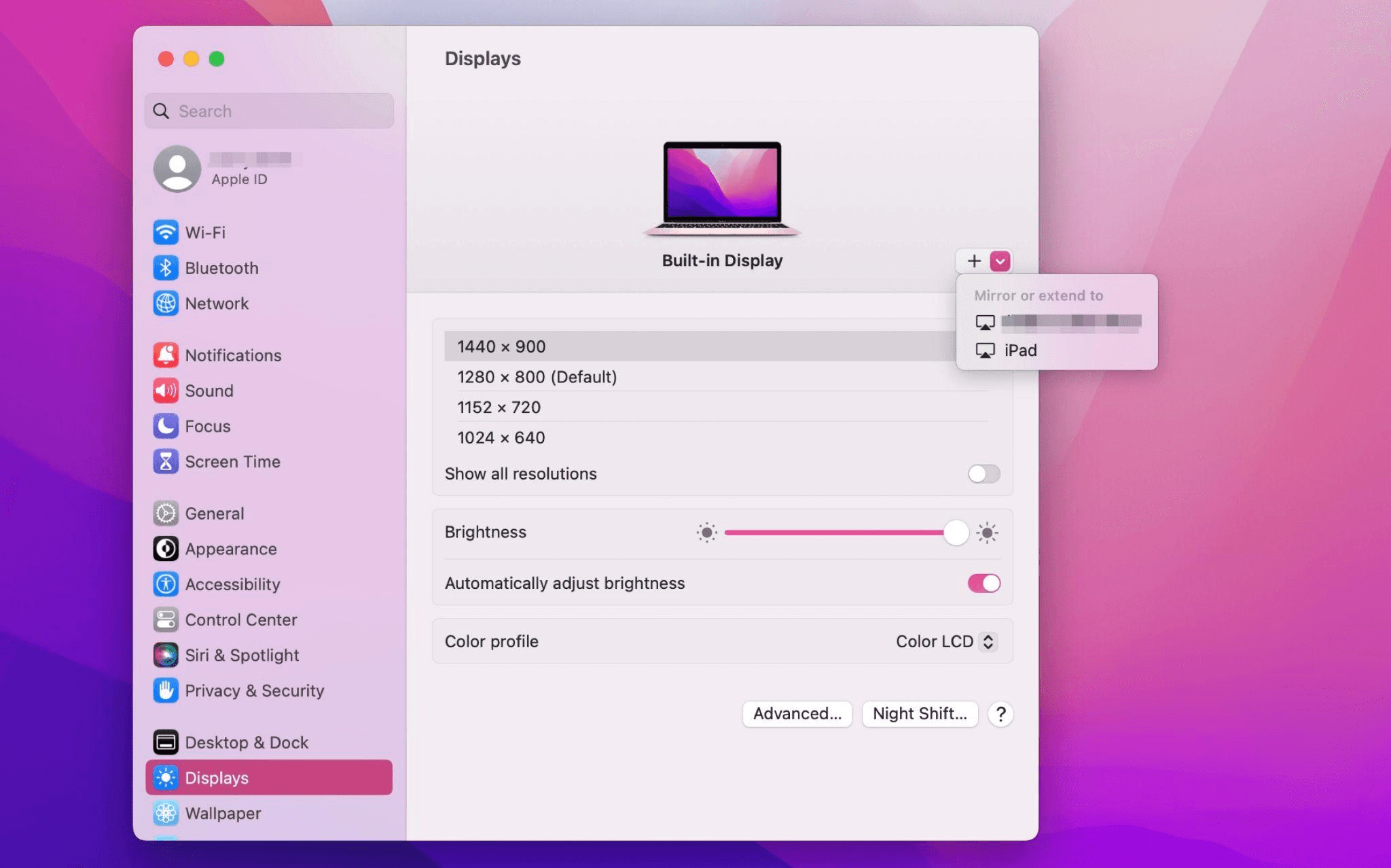
Select the iPad, change the Use as settings to "Extended Display". Check the Airplay settings on the top toolbar of the mac and set iPad as "Use As Separate Display".
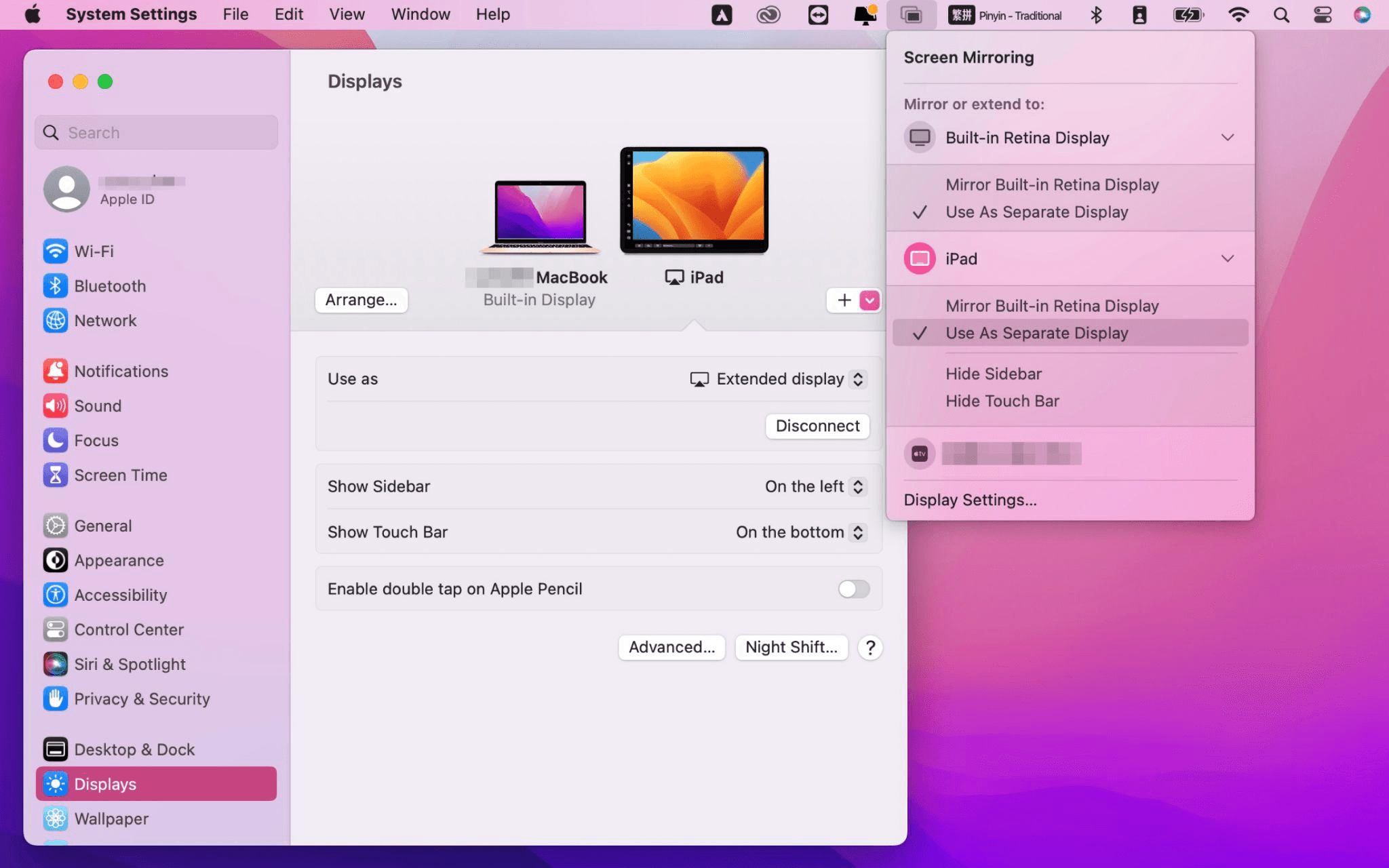
After completing the settings, your iPad will become the second display for your Mac. You can drag windows from your Mac to your iPad smoothly. You can also use the sidebar on the iPad or change the position of the sidebar on the system display settings.
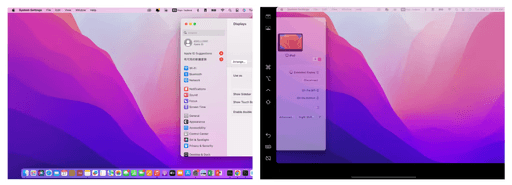
MacBook Screen (Left) and iPad Screen (Right)
Apple Sidecar only supports mac released after 2016 and iPadOS13 or newer. If you are using an old Apple device or a Windows device, you can still use DeskIn remote software to do the screen extension. It supports using iPad as a second display for Mac and Windows, and the smoothness is no worse than sidecar.
Install DeskIn on both your computer and iPad. Sign in to your DeskIn account on each device. When you log in on a new device for the first time, you may need to complete email verification to help protect your account.

To use Screen Extension, you'll need to subscribe to any Premium plan. Click here to view DeskIn plans.
Open DeskIn on your Windows or Mac computer, go to the screen management area, and choose the screen extension option. Select your iPad as the target display and start extending.
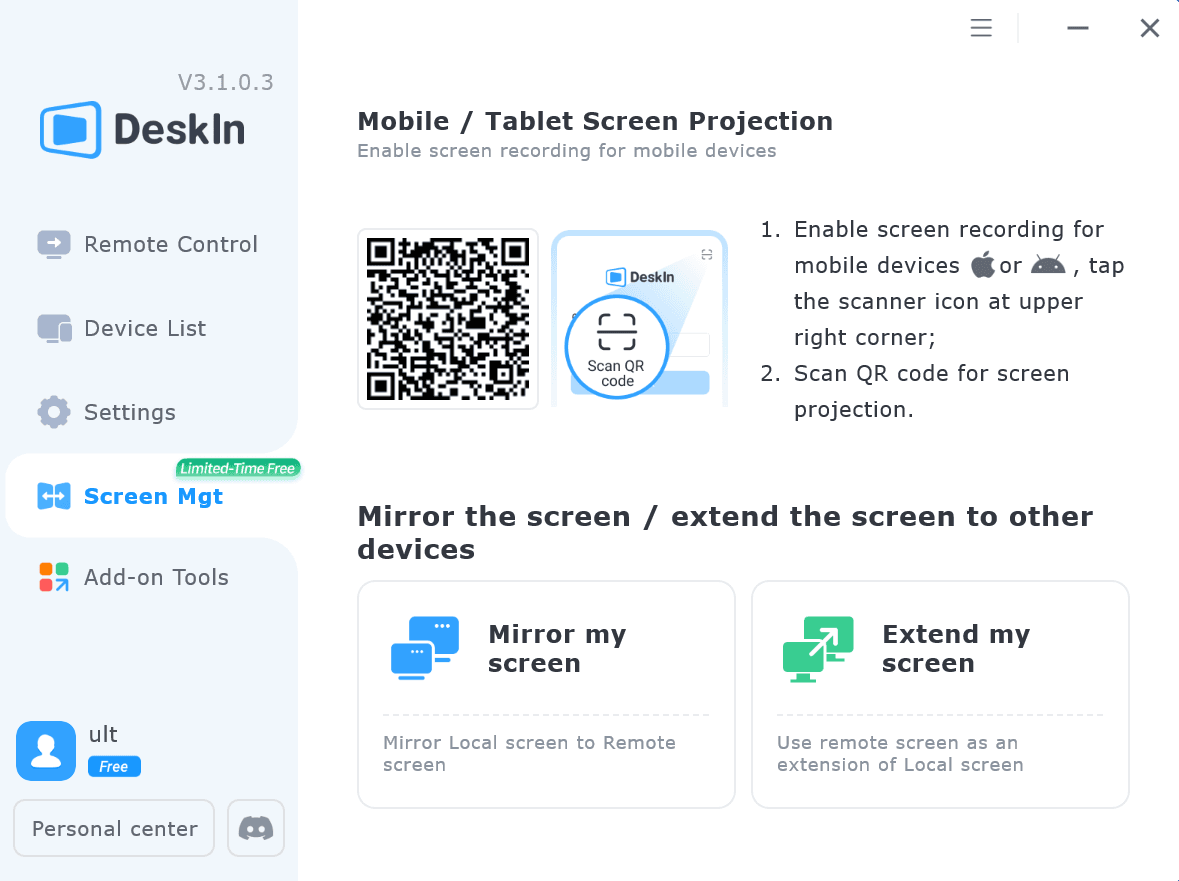
Once connected, your iPad can work as an additional display, letting you move windows between your computer and iPad for a wider workspace.
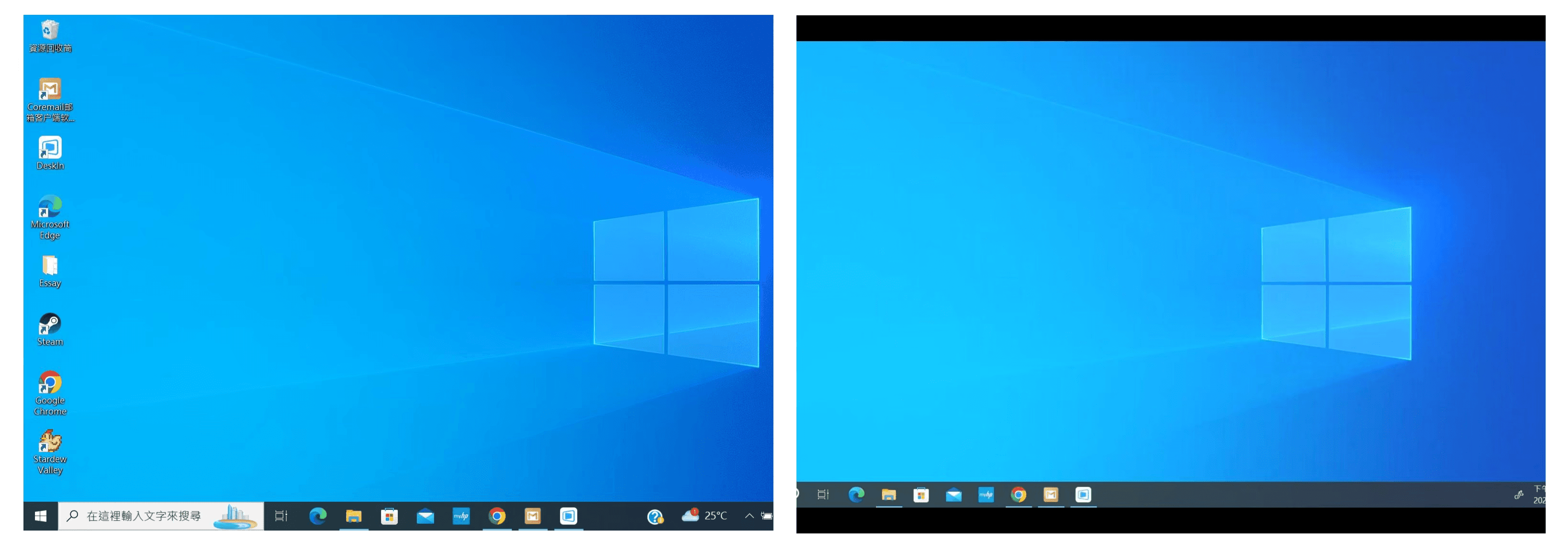
Computer Screen (Left) and iPad Screen (Right)
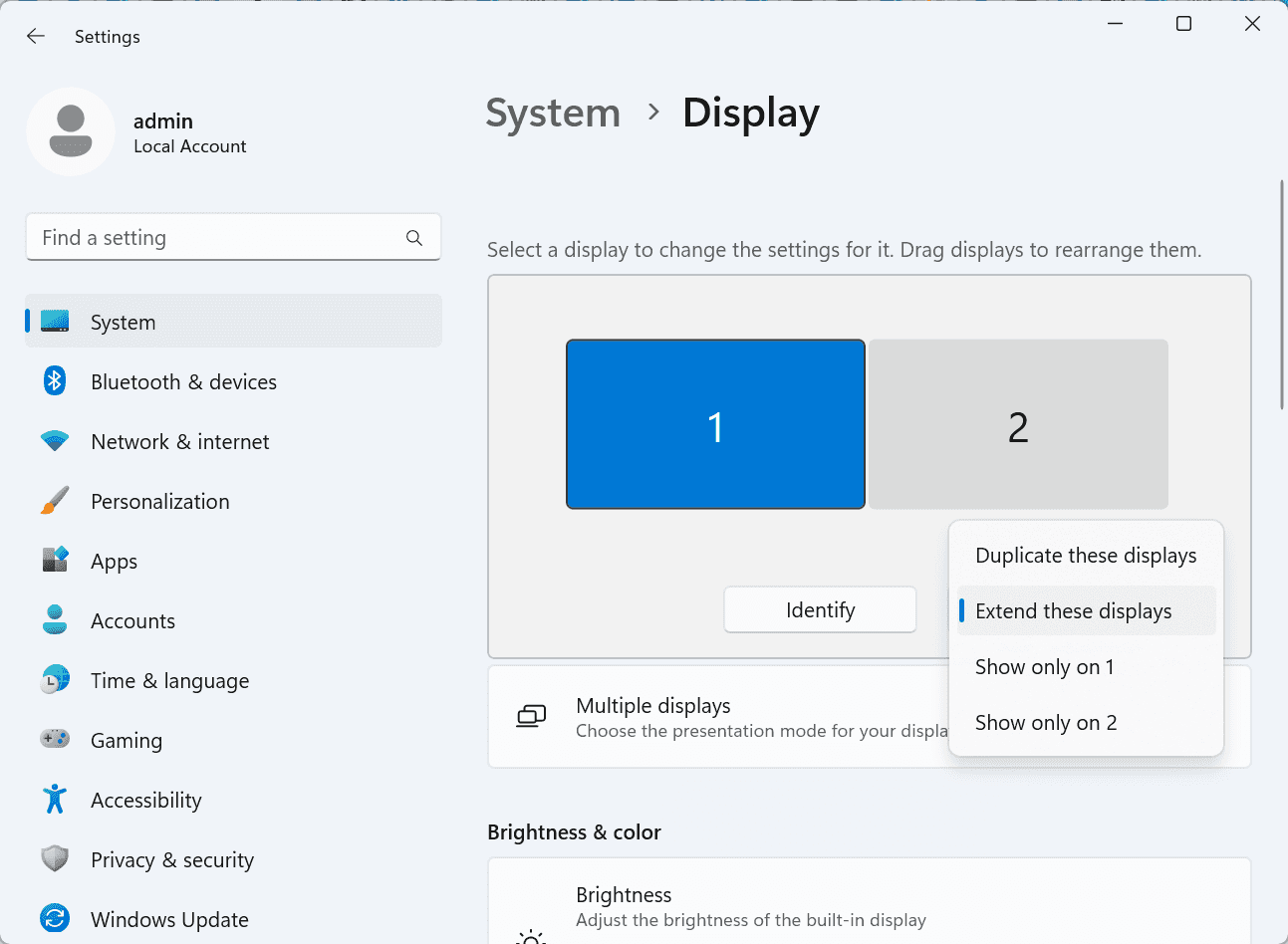
After extension, if you find that your iPad is only mirroring the content on your computer screen, please go to Windows System Settings >> Display Settings and change the screen option to "Extend these displays". You can also modify the screen position by dragging the 2 screens.
Need | Best Option | Why |
Use iPad as a second monitor for a compatible Mac | Apple Sidecar | Built into Apple devices and easy to set up when both devices are compatible. |
Use iPad as a second monitor for Windows | DeskIn | Sidecar does not support Windows, while DeskIn supports cross-platform screen extension on eligible plans. |
Work across Windows, macOS, iPad, Android tablets, and mobile devices | DeskIn | Better suited for users who need cross-platform remote access and flexible device combinations. |
Yes. Windows does not support Apple Sidecar, but you can use DeskIn screen extension on a paid plan that includes this feature to turn your iPad into an additional display for a Windows computer.
DeskIn Screen Extension is included in all paid plans. After subscribing, you can use it across all supported systems with no restrictions.
Yes. DeskIn supports using an iPad as an additional screen with Windows and Mac computers when your plan includes screen mirroring or screen extension.
Using an iPad as a second monitor is a practical way to expand your workspace without buying another display. Mac users with compatible devices can use Apple Sidecar, while Windows and cross-platform users can use DeskIn screen extension on eligible paid plans.
If you want to work across Windows, macOS, iPad, and other devices, DeskIn gives you a flexible way to build a portable multi-screen workspace. Download DeskIn and choose the plan that fits your screen extension and remote access needs.
How to Play MapleStory Classic World on Mac
A lot of the players who are most excited about MapleStory Classic World grew up on 2005-era MapleStory — and a large share of that generation now does its computing on a MacBook. Nexon clearly knows this: a native macOS client was on the feature list for the second Closed Online Test, which ran August 4–12, 2026, alongside Ossyria and third job advancement. But as of this writing, that Mac client is still in development, not publicly available, and there's still no confirmed public launch date for the game itself.
So if you want to play MapleStory Classic World on a Mac right now — or want a reliable plan for when the game does launch — you've got two real options: run Windows in a virtual machine, or use DeskIn remote desktop to control an actual Windows PC from your Mac. This guide covers both, including a login-conflict issue that catches a lot of virtual machine users off guard.
Not yet, publicly. Nexon's May 2026 roadmap update confirmed macOS support is in development, and it appeared as a testable feature in the second Closed Online Test. Windows PC remains the confirmed launch platform, and Nexon hasn't said whether the Mac client will be ready at launch or arrive afterward. The game hasn't had a full public release on any platform — Nexon has said one more test is planned before launch.
Given that, Mac players currently have two ways in: a Windows virtual machine, or remote desktop software that connects to a real Windows PC.
Classic World is exclusive to GMS (Global MapleStory), covering North America, Europe, and most other regions without a local Nexon partner. Markets with their own official MapleStory service — Korea, China, Japan, Taiwan/Hong Kong, and Southeast Asia — aren't GMS-eligible, so Mac players in those regions would need a VPN to reach Classic World, which isn't recommended. Whether NA and EU will run as separate worlds hasn't been confirmed.
Tools like Parallels Desktop or VMware Fusion let you run a full Windows install inside macOS, and then install MapleStory Classic World the way a Windows user would. It works, but it asks a lot of your Mac's hardware.
RAM: 16GB minimum recommended; 8GB is genuinely tight, since macOS and Windows are both running at once and macOS alone can eat most of that before Windows gets a share. For a comfortable setup with guides or Discord open on the side, aim for 32GB.
CPU/GPU: Virtual machines can't pass hardware through at 100%; graphics get software-emulated, which typically costs 20–30% of the performance you'd get on native Windows hardware.
Thermals: Running two full operating systems under load generates real heat, and laptop-class Macs with limited cooling can throttle during longer grinding sessions.
Apple Silicon translation overhead: M-series Macs can only run Windows on ARM in a VM. If Classic World ships as an x86/x64 build, it needs an extra translation layer to run at all, stacking on top of the virtualization overhead already mentioned.
Anti-cheat compatibility is a real unknown: the original MapleStory has historically been hostile to virtualized environments because of its anti-cheat system, and Nexon hasn't said how Classic World's anti-cheat will treat VMs. Treat virtualization as a maybe, not a guaranteed plan.
There's also the practical overhead: setting up a VM means downloading a Windows image, allocating dozens of gigabytes of disk space, installing display drivers, and — on Apple Silicon — dealing with ARM compatibility quirks that don't show up on a real x86 PC. Keyboard shortcuts can also conflict, since macOS system shortcuts (Control, Option, Command) don't always play nicely with a Windows game's default keybinds.
Instead of building a Windows environment inside your Mac, DeskIn lets you connect directly to a Windows PC you already have — your desktop at home, a work machine, or a spare laptop — and control it from your Mac in real time. The game runs on genuine Windows hardware the whole time, so there's no emulation tax, no ARM translation layer, and no anti-cheat guessing game.
A virtual machine makes sense if:
You don't have access to any Windows PC at all, so a Mac VM is your only option.
Your Mac has strong specs — 16GB+ RAM, ideally 32GB, and a higher-end M-series chip that can absorb the performance loss.
You're comfortable with a fairly technical setup process.
You rarely need to switch between devices, so the single-login limitation isn't a practical issue for you.
DeskIn makes more sense if:
You already have a Windows PC (or another Mac) that can run MapleStory Classic World, and you just want to reach it from your MacBook.
You're traveling or away from your desk often and want to pick up where you left off without re-downloading anything.
You don't want to deal with logging out of one device every time you switch to another.
Your Mac has more modest specs, and you'd rather not risk stutters, crashes, or a game that won't launch at all.
If you already own a Windows machine, DeskIn is generally the lower-effort, lower-risk choice. A VM is really a fallback for players with no Windows access and a Mac powerful enough to absorb the overhead.
Step 1: Set up the Windows PC. Install MapleStory Classic World on a Windows PC and create your character, then install DeskIn on that same PC, sign in, and enable unattended access with a connection password so you can reach it later without anyone at the keyboard.
Step 2: Install DeskIn on your Mac. Download the macOS version of DeskIn, sign in with the same account, and your Windows PC will appear in your device list.
Step 3: Connect. Select the PC, enter the connection password, and you'll get a live view of the Windows desktop that you control with your Mac's mouse and trackpad — the same session, the same login, no conflicts.
Step 4: Tune quality for your connection. On a stable connection, push quality up to enjoy Classic World's remastered pixel art in full detail; on the road, prioritize smoothness to cut down on input lag.
Step 5: Log in and play. Open the game inside the remote session and log in as usual — grinding, party quests, and shopping all work exactly as they would sitting at the PC directly.
Resolution and quality: Free-tier users should start around 720p/30fps for a stable baseline; paid-tier users can push up to 4K 60FPS or 2K 240FPS on a strong connection to get the most out of Classic World's art.
Screen scaling: If your Mac and Windows PC have very different display sizes, use DeskIn's automatic scaling option in the toolbar, or adjust the remote PC's resolution to match your Mac's screen more closely.
Keyboard and mouse mapping: DeskIn maps your Mac's keyboard directly to the remote PC. Turning on Game Mouse mode prevents the keyboard from getting locked mid-session.
Controller support: If Mac keyboard controls feel awkward, pair a controller to your Mac and enable controller mapping from the toolbar — DeskIn will pass those inputs straight through to the remote PC.
Simple Setup:No Windows installation required — connect and start playing within minutes.
Doesn't tax your Mac's hardware. All the actual computation happens on the remote Windows PC; your Mac just displays the stream and sends inputs.
Performance and compatibility match native Windows, because that's exactly what's running — no ARM translation layer to worry about.
No account login conflicts, since DeskIn connects to the same existing session instead of creating a new device.
Cross-device flexibility. The same account lets you connect from Mac, iPhone, iPad, or Android, and it's always the same underlying session — no juggling logins between devices.
Not publicly yet. Nexon has confirmed a macOS client is in development and tested it in the second Closed Online Test, but Windows remains the confirmed launch platform and no public Mac release has shipped.
Yes. DeskIn uses end-to-end encryption and two-factor login, and since you're remotely operating a PC you already control, your credentials never pass through a third party.
Technically you can install one, but the experience will be rough. With 8GB split between macOS and Windows, there's very little left over for Windows, and stutters or crashes become likely during longer sessions. DeskIn is the more stable option here, since the remote PC handles all the processing — your Mac's RAM isn't a bottleneck.
Real-world performance depends on both ends' network quality, but since DeskIn connects to native Windows hardware with no virtualization overhead, and its low-latency streaming keeps end-to-end delay under 40ms on a good connection, it typically feels smoother than a resource-constrained VM.
No. DeskIn controls the same PC and the same already-active session rather than logging in as a new device, so it doesn't trigger MapleStory's single-session login limit — this is exactly the conflict that trips up VM users switching between two separate Windows installs.
DeskIn needs a Windows (or other supported platform) machine to connect to. If you don't have one, consider borrowing access to a friend's or family member's PC, or renting a cloud Windows machine as your connection target.
DeskIn supports Windows, macOS, iOS, and Android. A Mac can connect to a Windows PC, and a Windows PC can just as easily connect to and control a Mac.
MapleStory Classic World doesn't have a public Mac client yet, but that doesn't mean Mac players have to gamble on a resource-hungry virtual machine and hope the anti-cheat cooperates. If you already have access to a Windows PC that can run the game — or even another Mac — connecting to it through DeskIn gets you native Windows performance, none of the virtualization overhead, and none of the account-login headaches that come with running a second "device." Set it up once, and you'll be ready to log in the moment Classic World opens its doors.
How to Play MapleStory Classic World on Mobile Before the Official App Arrives
MapleStory Classic World has turned into one of the most-searched topics in the MapleStory community this year. Nexon's pre-Big Bang server pulled in roughly 5,000 players for its first Closed Online Test back in April 2026, and thousands more signed up for the second test that ran August 4–12, 2026. With Ossyria, third job advancement, and controller support now confirmed, interest has never been higher — and a lot of that interest is coming from players who want to know one thing: can you play MapleStory Classic World on your phone?
Short answer: not with an official app, not yet. This guide breaks down exactly what Nexon has confirmed about platforms so far, then walks through how DeskIn remote desktop lets you play MapleStory Classic World on mobile right now, without waiting on an app that hasn't been announced.
As of this writing, Nexon has not announced a mobile or console version of MapleStory Classic World. The confirmed platforms are Windows PC and macOS — macOS support was specifically added as a testable feature during the second Closed Online Test in August 2026, alongside Ossyria and third job advancement, but it's still listed as "in development" rather than publicly available.
There's also no full public launch date yet. Nexon has run two Closed Online Tests so far and has said one more test is planned before release, so most community trackers currently estimate a launch window in late 2026 or early 2027 — but that's community speculation, not an official date.
Put simply: if you want to play MapleStory Classic World on a phone or tablet today, a native app isn't an option. The only practical route is streaming the PC version from a Windows machine you already have access to.
Classic World is exclusive to GMS (Global MapleStory), Nexon's English-language service for North America, Europe, and most other regions without a local Nexon partner. Players in markets with their own official MapleStory service — Korea, China, Japan, Taiwan/Hong Kong, and Southeast Asia — aren't eligible for GMS accounts, so Classic World isn't accessible there without a VPN, which isn't recommended. It's not yet confirmed whether NA and EU will run as separate worlds within Classic World.
DeskIn is a cross-platform remote desktop app built specifically with PC gaming in mind, and it maps well onto exactly the problem MapleStory Classic World mobile players are trying to solve.
Stable, low-latency connections. DeskIn's ZeroSync® engine keeps end-to-end latency under 40ms on a good connection and automatically reroutes around congested paths, so grinding, dodging, and skill combos in Classic World's classic-era combat don't feel delayed.
Up to 4K 60FPS / 2K 240FPS streaming. Classic World's remastered pixel art holds up well when it isn't compressed into mush — DeskIn's streaming keeps text and sprites sharp even on a phone screen.
You're connecting to your own PC, not emulating one. DeskIn doesn't run Windows inside your phone; it streams the display of a Windows computer you control and sends your inputs back in real time. That means full compatibility and full performance — no emulation layer to fight with.
End-to-end encryption and two-factor login. Sessions are encrypted end-to-end, and you can set an allowlist of authorized devices, so only you can connect to your own PC.
Flexible, per-character keybinds. Classic World's Warrior, Magician, Bowman, and Thief classes each use very different skill layouts. DeskIn's on-screen game keyboard lets you build a custom key layout and save it as its own profile, so you can switch between characters without re-mapping keys every time.
Built-in virtual mouse. In pointer mode, DeskIn adds virtual left/right mouse buttons over the stream, which makes precise UI clicks — inventory, cash shop, trade windows — far easier than tapping blindly on a touchscreen.
Once you're connected, mobile play through DeskIn covers pretty much everything you'd do sitting at your PC:
Daily quests and login rewards — knock these out on your commute instead of waiting until you're home.
Cash shop browsing — scroll and preview cosmetics with touch gestures just like any shopping app.
Grinding and leveling — use the virtual directional pad and skill-key layout to keep training in familiar maps.
Party quests — latency low enough to keep up with a party's pacing on runs like Kerning City PQ.
Trading and the marketplace — check prices and list items using the virtual mouse for precise clicks.
Guild chat and messaging — reply to your guild or party the moment something comes up.
Step 1: Set up DeskIn on the Windows PC running Classic World. Install DeskIn on the PC where you've registered for testing (or where the game is installed once it launches), sign in, and turn on unattended access so the PC can be reached without anyone sitting in front of it.
Step 2: Install the DeskIn app on your phone. Download DeskIn from the App Store or Google Play, sign in with the same account, and your PC will show up in the device list.
Step 3: Connect and switch to pointer mode. Tap your PC to connect, then switch the control mode from touch to pointer — this unlocks the customizable virtual keyboard and virtual mouse.
Step 4: Browsing the cash shop. Drag to move the cursor and tap the virtual mouse buttons to click through menus and item previews, exactly like using a mouse on a desktop.
Step 5: Grinding. Open the game keyboard menu, build a layout with your movement keys and skill keys, and save it as a profile. Pull it up any time you start a grinding session.
Step 6: Pick the right streaming quality for your connection. On mobile data, prioritize smoothness over resolution to cut down on input delay; on Wi-Fi, bump the quality up to enjoy Classic World's remastered art at full clarity.
A tablet's bigger screen is a natural fit for content that needs either more reading room or more precision — daily quest text and boss encounters both qualify.
Step 1: Same setup as mobile. Install DeskIn on your iPad or Android tablet and sign in — connection steps are identical to the phone app.
Step 2: Daily quests. The larger display makes quest text, item descriptions, and map markers easier to read at a glance, so you're less likely to misread an objective mid-run.
Step 3: Boss fights. Bosses demand precise dodges and timing that touch controls alone can struggle with — pair your tablet with a Bluetooth keyboard and mouse, or a controller (see below), instead of relying on the virtual keyboard.
Step 4: Bump the frame rate for boss content. Choose a higher refresh setting in DeskIn's connection options so skill telegraphs and boss patterns read clearly in real time.
Step 5: Use split-screen for guide lookups. Run DeskIn alongside a browser or notes app in split view to check attack patterns without leaving the fight.
If virtual buttons don't feel precise enough, DeskIn supports Bluetooth controllers, including Xbox, PlayStation, and several third-party pads.
Step 1: Pair the controller with your phone. Use your phone's Bluetooth settings to pair the controller first.
Step 2: Connect through DeskIn. Once connected to your PC, DeskIn automatically detects the paired controller — no extra driver install needed.
Step 3: Test your inputs. Head into a training map first and confirm movement, attacks, and skills map to the buttons you expect before jumping into content that matters.
Step 4: Favor smoothness for fast-paced play. When you're actively grinding or fighting with a controller, prioritize DeskIn's smoothness setting over max resolution for the most responsive feel.
Running a Warrior and a Bowman means running two very different skill bars. Here's how to keep them separate in DeskIn instead of re-mapping keys every login:
Step 1: Switch to pointer mode and open the game keyboard menu. After connecting, switch to pointer mode and open DeskIn's game keyboard settings.
Step 2: Create a new keyboard layout. Tap "New Keyboard" and add your movement pad, skill keys, and item keys to match your current character's build.
Step 3: Name it by character or class. Label the layout something identifiable — "Bowman" or "Main Warrior" — and save it.
Step 4: Load the right profile when you switch characters. Before logging into a different character, select its saved layout from the game keyboard menu instead of rebuilding it from scratch.
Step 5: Update layouts as skills change. When a class gets rebalanced or you unlock new skills after a job advancement, go back into that profile and add the new keys.
No. Nexon has not announced a mobile or console version. Confirmed platforms are Windows, with a macOS client currently in development.
Nexon hasn't announced a public release date. Two Closed Online Tests have run so far (April 16–24 and August 4–12, 2026), with one more test planned before launch. Community estimates point to late 2026 or early 2027, but that isn't official.
No. DeskIn remotely operates your own PC and sends the same mouse and keyboard input you'd normally use — it isn't a macro, bot, or memory-editing tool, so it doesn't behave like the automation that anti-cheat systems are built to catch.
DeskIn's low-latency streaming keeps things playable on a stable connection, generally noticeably smoother than trying to force a browser workaround. Real-world latency still depends on both ends' network quality, so Wi-Fi is recommended over cellular when possible.
For checking dailies or browsing the shop occasionally, the free plan typically covers it. If you plan to grind for long sessions, use a controller regularly, or manage several devices, a paid plan unlocks higher streaming quality and additional features.
Setup and connection steps are identical. The difference is screen size — phones are handy for quick, single-hand tasks like dailies and the shop, while tablets are better suited to boss fights and content where you want a controller or external keyboard.
Until Nexon ships a mobile client — if one ever gets announced — DeskIn is the most practical way to keep playing MapleStory Classic World away from your desk. Install it on both your gaming PC and your phone or tablet, set up a keybind profile per character, and you can knock out dailies, grind, and even tackle boss fights without being tied to a monitor.
Products
ดาวน์โหลด
Resources
ติดต่อเรา
Email: support@deskin.io
Office: 991D Alexandra Road #02-17, Singapore 119972
Copyright © 2026 Zuler Technology PTE. LTD. All rights reserved.
ติดต่อเรา
Email: support@deskin.io
Office: 991D Alexandra Road #02-17, Singapore 119972
Products
ดาวน์โหลด
Resources
Copyright © 2026 Zuler Technology PTE. LTD. All rights reserved.
Products
ดาวน์โหลด
Resources
ติดต่อเรา
support@deskin.io
991D Alexandra Road #02-17
Singapore 119972
Copyright © 2026 Zuler Technology PTE. LTD. All rights reserved.
【New User Special Offer】
Save
Extra 20%
on your first order|4K60FPS
Extra
20% Off
|For
New Users
【New User Special Offer】
Save
Extra 20%
on first order


