比較
比較
/
5 Minutes
/
5 Minutes
GA
更新済み
更新済み
更新済み
理想を言えば、色があふれ出しそうなほど美しいディスプレイに、フル装備のゲーミングPC。
いつでもその最高の環境の前に座っていたいですよね。
でも現実はそうはいきません。出張や外出中だったり、家の外にいたり、あるいは同じ家の中でも、ゲーミングチェアよりずっと快適なソファでくつろいでいたり。
それでもふと、「あの世界に戻りたい」「自分のキャラで、あの環境で遊びたい」そんな気持ちが強く湧いてくるものです。
幸い、今のゲーム環境は進化しています。今では、どこからでも遊ぶための方法が大きく2つあります。それが、リモートゲーミングとクラウドゲーミングです。
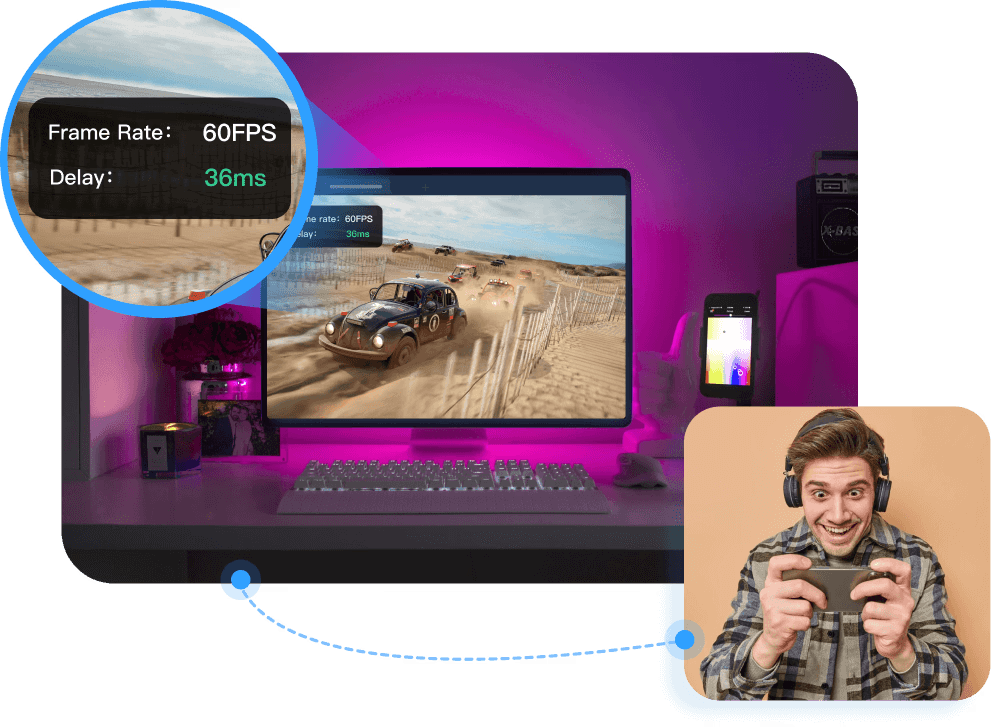
リモートゲームとは、その名の通り、ローカルPCにインストールされたゲームをどこからでも操作してプレイすることです。遠くのデータセンターのクラウドサーバーから引き出すのではなく、自宅のゲーミングリグにリモートデスクトップソフトウェアを使って直接接続します。
そして最大の利点は、制限のあるレンタルサーバーに依存せず、自分のハードウェア、自分の設定、自分のモッド、自分のセーブ、自分のパフォーマンスを活かせるということです。すべてがすでに所有しているPC上で動作します。
ここでDeskInによってリモートゲームがほぼ魔法のように感じられるのです。
多くのリモートツールはExcelシートや画面共有のために設計されていますが、DeskInは異なります。低レイテンシーのゲーミング、高FPSストリーミング、そしてリアルタイムの応答性に最適化されており、1フレームが重要な時に本当に重要な要因を考慮しています。
ベースバージョンは無料で利用可能で、Gaming Editionは高パフォーマンスプレイのための高度な機能をアンロックしますが、ほとんどのクラウドゲームのサブスクリプションよりも依然としてはるかに手頃な価格です。

DeskInのリモートゲームは、際立った強力な機能を備えています。
クロスシステムの互換性
Windows、macOS、Android、iOSをシームレスに横断しながらプレイ可能。DeskInではPCでゲームを開始し、そのままスマホやタブレット、Macに切り替えても、互換性の問題はありません。真の柔軟性を持つマルチデバイスゲーマー向けです。

4K60FPSまたは2K240FPSストリーミング
超高解像度 + 高フレームレート = ローカルではないリモート感のないゲームプレイ。ぼけもなく、スタッターもなく、純粋にスムーズなゲームプレイ。
200+のグローバルネットワークノードで40ms未満のレイテンシー
あなたに追従するスピードです。頭を撃ち抜いたり、完璧なパリをタイミングよく決めたりする時に、DeskInはあなたの入力を即座に反映します。
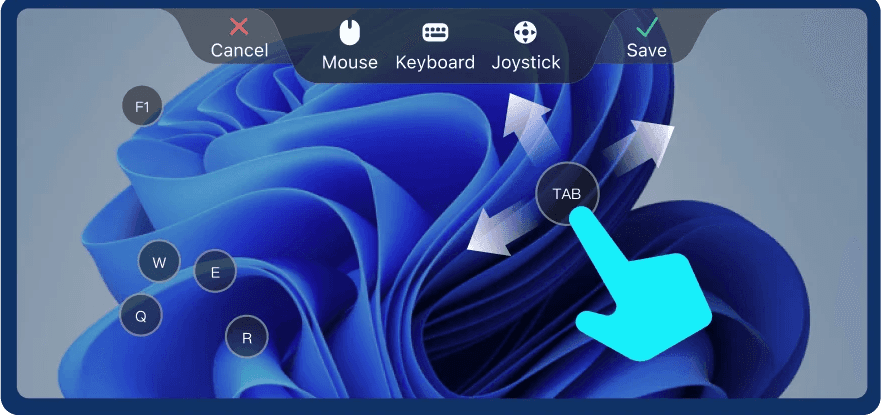
モバイルに最適化されたPCゲームのホットキー
あなたの携帯が本当のコントローラーになります。タップ、スワイプ、プリセットコンボキーの発動、仮想ボタンの操作不要。
携帯でコントロールを最適化するのが好きなプレイヤー向けに、PCゲームを携帯でプレイするためのカスタムゲーミングキーボードとホットキーの使用方法の完全なチュートリアルを用意しています。
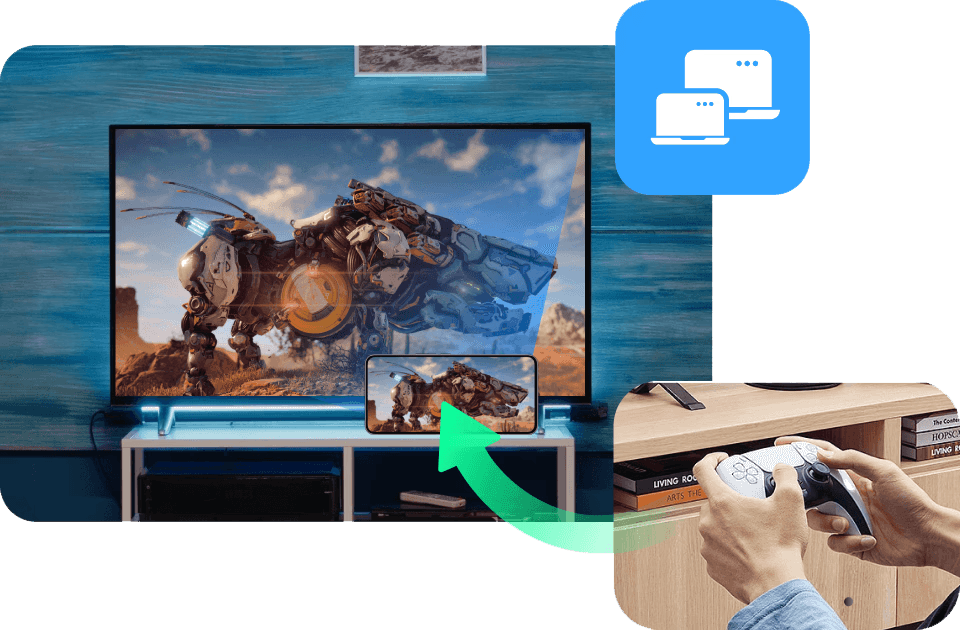
コントローラーの全サポート
Xbox、PlayStation、サードパーティブランド、どれでも対応可能。繋げてプレイするだけ。
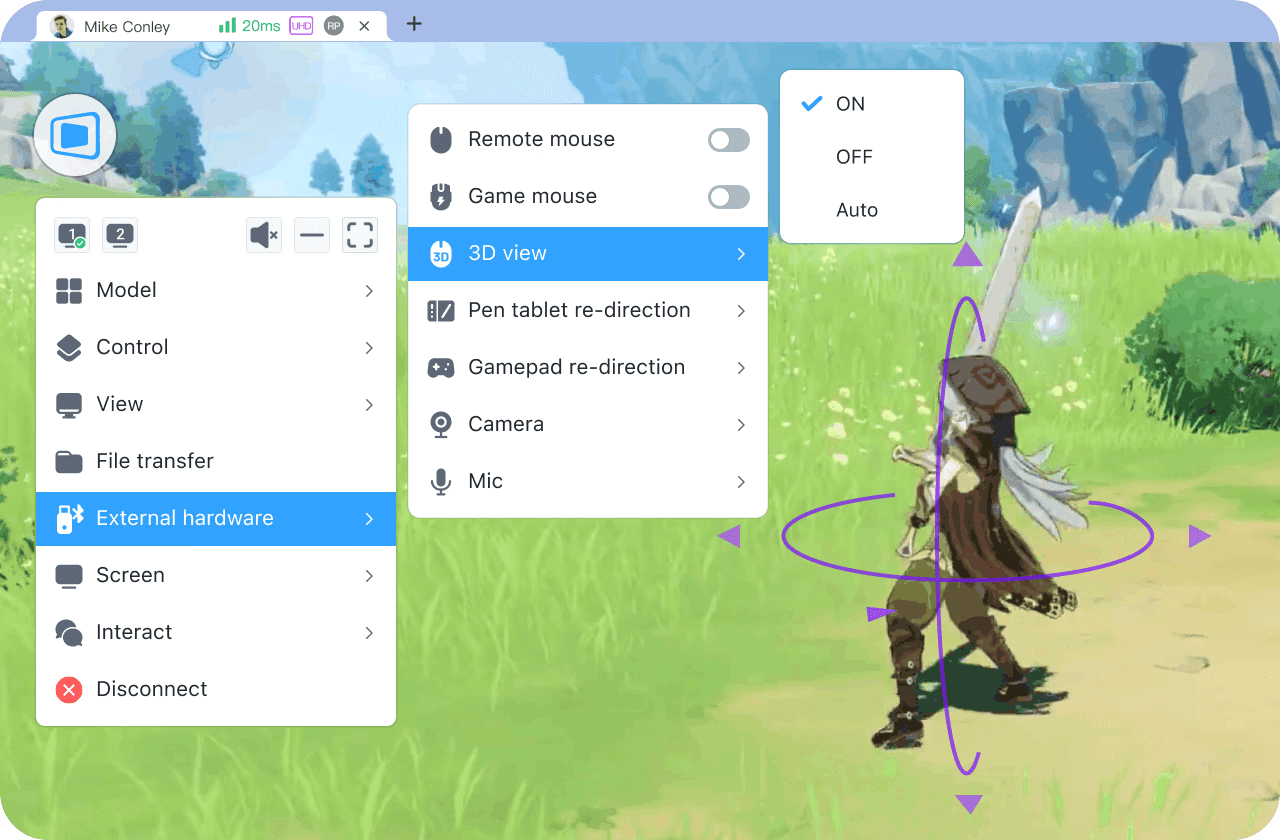
3Dビューコントロールモード
視点を瞬時に切り替えられます。複雑なシーンをナビゲーションしたり、角度をもっと直感的で動的に制御できます。
画面ミラーリング&マルチスクリーンエクステンション
どんな画面でもあなたのゲームセットアップの一部に。ディスプレイをミラーリングまたは拡張し、マルチタスクやマップビュー、ストリーミングが可能。
携帯の画面をPCに戻してプロジェクトする
携帯をクイックストリーミングレイアウトやモバイルゲームキャプチャのためにPCに逆ストリームします。
高速ファイル転送
モッド、シェーダー、セーブファイル、スクリーンショット、パッチなどを即座に転送可能。ケーブル不要で手間なし。
リモートゲームが真に応答性が高く、カスタマイズされ、制約がない形でプレイしたいなら、DeskInが最適です。今すぐ無料で試してその違いを体感してください。
続きを読む:
クラウドゲームはリモートゲームとは非常に異なるアプローチをとっています。ゲームPCにアクセスするのではなく、クラウドゲームはリモートサーバーから直接ゲームをストリーミングします。それは他の誰かによって管理され、維持されるものです。それをゲーム用Netflixのように想像してください:クリック、ストリーム、プレイ。
この空間をリードする主要プラットフォームには、次のようなものがあります:
Xbox Cloud Gaming
NVIDIA GeForce Now
PlayStation Now
Amazon Luna
これらのサービスはデータセンターで強力なGPUとCPUを実行し、そこでゲームをレンダリングし、そのビデオ出力をあなたのデバイスにストリームします。すべての計算はオフサイトで行われ、デバイスは単にストリームを表示し、入力を返します。
クラウドゲームは便利さにおいて際立っています:
ミニマルセットアップ — アプリを開いてプレイを開始
ゲーミングPCは不要 — 低性能ラップトップやモバイルデバイスでもAAAタイトルが実行可能
ハードウェア不要の体験 — アップグレード不要、メンテナンス不要、GPU不足なし
カジュアルまたは時折のゲーマーにとって、これは大きな勝利です。
しかし、リモートゲームと比較すると、クラウドゲームは性能とコントロールの面で妥協を感じることがあります。
高いレイテンシー
あなたの入力はクラウドサーバーに届くために遠くまで移動する必要があり、性能はサーバーの距離と混雑に大きく依存します。高いpingは一般的です。
グラフィックスと設定の制御力の低下
ゲームはクラウドハードウェアで実行されるため、プロバイダの設定に制限されます。
限られたゲームライブラリ
個人的にモッドを施したSkyrimや無名のインディーゲームは、これらのプラットフォームには全く存在しないかもしれません。
サブスクリプション料金
クラウドゲームは月額費用がかかり、時折より良い性能を得るために複数のティアが必要です。
モッドなし、カスタマイズ無し
環境は固定されているため、テクスチャパック、ENB、個人的な調整はできません。
レンダリング、処理、エンコーディングのすべてがクラウドで行われるため、サーバーの距離、ネットワークの安定性、プラットフォームの制限に左右されます。開始は迅速ですが応答は必ずしも速くはなく、ゲームプレイが激しくなるとそれは重要になります。
クラウドゲームは素早いアクセスとハードウェアの頭痛がないことを求めるプレイヤーに最適です。ただし、スピード、忠実さ、所有権、柔軟性を重視するのであれば、リモートゲームとはまったく異なる世界です。
続きを読む: 簡単にXboxゲームを携帯でプレイする方法(完全ガイド)
クラウドゲームとリモートゲームは、表面的には同じように機能するように聞こえるかもしれませんが、実際には非常に異なる方法で動作します。そして、それらの違いは、スピードやコントロール、費用や長期的な柔軟性に関するすべてに影響を及ぼします。
ここでは、それらの要因がプレイヤーにとって何を意味するのか、ハードウェアの所有権、レイテンシー、ゲームライブラリ選択の自由、プライバシー、パフォーマンスの制御、総合コストを見てみましょう。
以下は2つを並べたクリーンな比較ですので、どれが勝つかすぐに決めることができます。
カテゴリー | リモートゲーム(DeskIn) | クラウドゲーム(GeForce Now、Xbox、Luna) |
ハードウェア所有権 | 自分自身のゲーミングPCを使用します;仕様の完全な制御 | プロバイダによって所有されるハードウェア;共有サーバー |
レイテンシー&入力ラグ | はるかに低い(LAN: 5–20 ms; オンライン: DeskInで<40 ms) | 高いレイテンシー(サーバー距離に応じて40–100+ ms) |
グラフィックス&FPS | 2K240FPS/4K60FPS | 指定上限または圧縮;可変の画像品質 |
ゲームライブラリ | 無制限;PCにインストールされているものすべて、モッドを含む | プラットフォームサポートを受けたタイトルに限定;モッドなし |
パフォーマンス制御 | 完全に制御:設定、調整、オーバークロック、シェーダー | プラットフォームのプリセットのみ;ハードウェアや深い設定アクセス無し |
コスト | 無料または低コスト(DeskInのベースは無料) | 定期的なサブスクリプション料金;性能向上のための複数ティア |
最適な対象 | すべてのゲーマー(カジュアルプレイヤー、競技プロ、モッダー、ストリーマー)、旅行者、マルチデバイスユーザー、クリエーター、開発者。 | カジュアルなプレイヤー、低性能デバイスユーザー、性能やモッド、低レイテンシーよりも便利さを重視する人々にだけ適しています。 |
リモートゲームとクラウドゲームの仕組みを分解した今、それを選びやすくしましょう。最適な選択はあなたが所有しているもの、どのようにプレイするか、どんな体験を期待しているかによります。
ここでは、実際のゲームプレイの習慣を用いたシナリオベースのガイドを提供し、特にDeskInのようなゲーミング用リモートデスクトップと低レイテンシーのストリーミングを考慮する場合に、各オプションが適切な場合を示します。
ゲームPCまたはリモートPCを所有している場合
リモートゲームでは、ハードウェアの力を最大限に活用できます。制限なし、キャップなしで、フルリグをどんなデバイスにもストリーミングできます。
レイテンシー、応答性、視覚的品質が重要な場合
入力のタイミングが重要な場合や、圧縮なしでクリアなグラフィックスを求める場合、リモートゲーミングデスクトップのパフォーマンスは無類です。
モッドを施した、カスタマイズされた、またはローカル専用ゲームをプレイしたい場合
クラウドゲームサービスはモッド、カスタムファイル、ENB、ニッチなタイトルをサポートしていません。リモートゲームは、PCにインストールされているものすべてを実行し、大幅にモッドされたセットアップも含みます。
ライブラリと設定を完全に制御したい場合
セーブ、設定、シェーダー、ランチャー、それらすべてがリモートでゲームをストリーミングする際に持ち越されます。
柔軟性を重視する場合
自宅のPCからリビングルームのTVにストリーミングしたり、カフェでタブレットでゲームをプレイしたり、旅行中に設定にアクセスしたり、DeskInがあればどこにいても完全にコントロールできます。
リモートゲームは、特に低レイテンシーのストリーミング、完全なカスタマイズ、PC品質のリモートゲーム体験を望むゲーマーに対しては、このような妥協を拒むものです。
ゲームPCを持っていない場合
クラウドゲームは、ノートPCや携帯デバイスがAAAタイトルを実行できない場合に最適です。重い処理はリモートで行われます。
カジュアルプレイが必要な場合のみ
もし、スローペースのゲームを遊んでいて、少しのレイテンシーが気にならない場合は、クラウドゲームサービスで十分です。
月額サブスクリプションに問題ない場合
クラウドゲームプラットフォームは定期的な料金が発生し、時にはより良いパフォーマンスのために複数ティアが必要です。
モッドやフルライブラリーアクセスが必要ない場合
ゲームの可用性は完全にプロバイダー次第であり、モッドは不可能です。
クラウドゲームは便利さを求めるためのものであり、コントロールではありません。素早いアクセスを求めるが、カスタムビルドや強力なGPU、超スムーズな応答性を気にしない場合に最適です。
スピード、精度、自分の全ゲームライブラリ、そして無制限のリモートゲームの自由が欲しい場合、DeskInリモートゲームが明らかに勝者です。
シンプルさが欲しいが、ゲーミングPCを持っていない場合、クラウドゲームがより実用的な選択肢です。
どちらも移動中にプレイ可能です。しかし、リアルPCのパフォーマンスと制約のないゲームプレイの柔軟性を提供するのは片方だけです。
リモートゲームは低レイテンシーでクラウドゲームより良いですか?
はい。リモートゲームは自分のPCを処理のために使用するため、5–20 msの低レイテンシーのストリーミングを提供します。クラウドゲームはサーバーの距離に依存し、40–100 ms以上になることがよくあります。
リモートゲームを通じてモッドされたまたはローカル専用ゲームをプレイできますか?
絶対にできます。リモートゲームでは、すべてのゲームライブラリにアクセス可能で、モッド、カスタムファイル、およびローカル専用のタイトルも含まれます。クラウドゲームはモッドをサポートしません。
ゲームをリモートでストリーミングするのに強力なデバイスが必要ですか?
いいえ。デバイスはストリームを表示するだけで済みます。ゲームを行うためのリモートデスクトップ、例えばDeskInを使用すれば、低性能のラップトップ、タブレット、携帯電話でリモートでゲームをストリーミング可能です。
競技ゲームにクラウドゲームは良いですか?
通常はそうではありません。高いレイテンシーと入力遅延のため、クラウドゲームはシューティングゲーム、リズムゲーム、その他の精度の求められるタイトルでは苦戦することがあります。リモートゲームは競技プレイヤーにより応答の良い経験を提供します。
ゲームのストリーミング中にコントローラーを使用できますか?
はい。DeskInはフルゲームコントローラーの適応をサポートしており、リモートゲーミングデスクトップからストリーミングする際にPlayStation、Xbox、サードパーティのコントローラーを使用可能です。
リモートゲームとクラウドゲームは両方ともどこでもプレイを可能にしますが、唯一一つだけがハードウェアをあなたの手に握らせます。クラウドゲームは便利さを提供しますが、レイテンシーの問題、サブスクリプションとライブラリの制限、他の人のハードウェアを使用する際のパフォーマンス制約があります。
DeskInはこれに対してリモートゲームコンテキストにおいて逆のメリットを提供します:速度、安定性、完全な所有権。超低レイテンシー、すべてのゲームライブラリ(モッド含む)を持ち、強力なPCから繰り返しの使用料なしでストリームできます。それはより速く、より多用途で、よりコスト効率の高いプレイの方法であり、フェアユースポリシーなし、品質に妥協なし、そしてラグのほぼ皆無。
いつでもどこでもお気に入りのPCゲームをプレイする準備はできていますか?DeskInをダウンロードして、今すぐリモートゲームを始めましょう:速く、無料、ゲーマー向けに設計されています。
理想を言えば、色があふれ出しそうなほど美しいディスプレイに、フル装備のゲーミングPC。
いつでもその最高の環境の前に座っていたいですよね。
でも現実はそうはいきません。出張や外出中だったり、家の外にいたり、あるいは同じ家の中でも、ゲーミングチェアよりずっと快適なソファでくつろいでいたり。
それでもふと、「あの世界に戻りたい」「自分のキャラで、あの環境で遊びたい」そんな気持ちが強く湧いてくるものです。
幸い、今のゲーム環境は進化しています。今では、どこからでも遊ぶための方法が大きく2つあります。それが、リモートゲーミングとクラウドゲーミングです。
リモートゲームとは、その名の通り、ローカルPCにインストールされたゲームをどこからでも操作してプレイすることです。遠くのデータセンターのクラウドサーバーから引き出すのではなく、自宅のゲーミングリグにリモートデスクトップソフトウェアを使って直接接続します。
そして最大の利点は、制限のあるレンタルサーバーに依存せず、自分のハードウェア、自分の設定、自分のモッド、自分のセーブ、自分のパフォーマンスを活かせるということです。すべてがすでに所有しているPC上で動作します。
ここでDeskInによってリモートゲームがほぼ魔法のように感じられるのです。
多くのリモートツールはExcelシートや画面共有のために設計されていますが、DeskInは異なります。低レイテンシーのゲーミング、高FPSストリーミング、そしてリアルタイムの応答性に最適化されており、1フレームが重要な時に本当に重要な要因を考慮しています。
ベースバージョンは無料で利用可能で、Gaming Editionは高パフォーマンスプレイのための高度な機能をアンロックしますが、ほとんどのクラウドゲームのサブスクリプションよりも依然としてはるかに手頃な価格です。
DeskInのリモートゲームは、際立った強力な機能を備えています。
クロスシステムの互換性
Windows、macOS、Android、iOSをシームレスに横断しながらプレイ可能。DeskInではPCでゲームを開始し、そのままスマホやタブレット、Macに切り替えても、互換性の問題はありません。真の柔軟性を持つマルチデバイスゲーマー向けです。
4K60FPSまたは2K240FPSストリーミング
超高解像度 + 高フレームレート = ローカルではないリモート感のないゲームプレイ。ぼけもなく、スタッターもなく、純粋にスムーズなゲームプレイ。
200+のグローバルネットワークノードで40ms未満のレイテンシー
あなたに追従するスピードです。頭を撃ち抜いたり、完璧なパリをタイミングよく決めたりする時に、DeskInはあなたの入力を即座に反映します。
モバイルに最適化されたPCゲームのホットキー
あなたの携帯が本当のコントローラーになります。タップ、スワイプ、プリセットコンボキーの発動、仮想ボタンの操作不要。
携帯でコントロールを最適化するのが好きなプレイヤー向けに、PCゲームを携帯でプレイするためのカスタムゲーミングキーボードとホットキーの使用方法の完全なチュートリアルを用意しています。
コントローラーの全サポート
Xbox、PlayStation、サードパーティブランド、どれでも対応可能。繋げてプレイするだけ。
3Dビューコントロールモード
視点を瞬時に切り替えられます。複雑なシーンをナビゲーションしたり、角度をもっと直感的で動的に制御できます。
画面ミラーリング&マルチスクリーンエクステンション
どんな画面でもあなたのゲームセットアップの一部に。ディスプレイをミラーリングまたは拡張し、マルチタスクやマップビュー、ストリーミングが可能。
携帯の画面をPCに戻してプロジェクトする
携帯をクイックストリーミングレイアウトやモバイルゲームキャプチャのためにPCに逆ストリームします。
高速ファイル転送
モッド、シェーダー、セーブファイル、スクリーンショット、パッチなどを即座に転送可能。ケーブル不要で手間なし。
リモートゲームが真に応答性が高く、カスタマイズされ、制約がない形でプレイしたいなら、DeskInが最適です。今すぐ無料で試してその違いを体感してください。
続きを読む:
クラウドゲームはリモートゲームとは非常に異なるアプローチをとっています。ゲームPCにアクセスするのではなく、クラウドゲームはリモートサーバーから直接ゲームをストリーミングします。それは他の誰かによって管理され、維持されるものです。それをゲーム用Netflixのように想像してください:クリック、ストリーム、プレイ。
この空間をリードする主要プラットフォームには、次のようなものがあります:
Xbox Cloud Gaming
NVIDIA GeForce Now
PlayStation Now
Amazon Luna
これらのサービスはデータセンターで強力なGPUとCPUを実行し、そこでゲームをレンダリングし、そのビデオ出力をあなたのデバイスにストリームします。すべての計算はオフサイトで行われ、デバイスは単にストリームを表示し、入力を返します。
クラウドゲームは便利さにおいて際立っています:
ミニマルセットアップ — アプリを開いてプレイを開始
ゲーミングPCは不要 — 低性能ラップトップやモバイルデバイスでもAAAタイトルが実行可能
ハードウェア不要の体験 — アップグレード不要、メンテナンス不要、GPU不足なし
カジュアルまたは時折のゲーマーにとって、これは大きな勝利です。
しかし、リモートゲームと比較すると、クラウドゲームは性能とコントロールの面で妥協を感じることがあります。
高いレイテンシー
あなたの入力はクラウドサーバーに届くために遠くまで移動する必要があり、性能はサーバーの距離と混雑に大きく依存します。高いpingは一般的です。
グラフィックスと設定の制御力の低下
ゲームはクラウドハードウェアで実行されるため、プロバイダの設定に制限されます。
限られたゲームライブラリ
個人的にモッドを施したSkyrimや無名のインディーゲームは、これらのプラットフォームには全く存在しないかもしれません。
サブスクリプション料金
クラウドゲームは月額費用がかかり、時折より良い性能を得るために複数のティアが必要です。
モッドなし、カスタマイズ無し
環境は固定されているため、テクスチャパック、ENB、個人的な調整はできません。
レンダリング、処理、エンコーディングのすべてがクラウドで行われるため、サーバーの距離、ネットワークの安定性、プラットフォームの制限に左右されます。開始は迅速ですが応答は必ずしも速くはなく、ゲームプレイが激しくなるとそれは重要になります。
クラウドゲームは素早いアクセスとハードウェアの頭痛がないことを求めるプレイヤーに最適です。ただし、スピード、忠実さ、所有権、柔軟性を重視するのであれば、リモートゲームとはまったく異なる世界です。
続きを読む: 簡単にXboxゲームを携帯でプレイする方法(完全ガイド)
クラウドゲームとリモートゲームは、表面的には同じように機能するように聞こえるかもしれませんが、実際には非常に異なる方法で動作します。そして、それらの違いは、スピードやコントロール、費用や長期的な柔軟性に関するすべてに影響を及ぼします。
ここでは、それらの要因がプレイヤーにとって何を意味するのか、ハードウェアの所有権、レイテンシー、ゲームライブラリ選択の自由、プライバシー、パフォーマンスの制御、総合コストを見てみましょう。
以下は2つを並べたクリーンな比較ですので、どれが勝つかすぐに決めることができます。
カテゴリー | リモートゲーム(DeskIn) | クラウドゲーム(GeForce Now、Xbox、Luna) |
ハードウェア所有権 | 自分自身のゲーミングPCを使用します;仕様の完全な制御 | プロバイダによって所有されるハードウェア;共有サーバー |
レイテンシー&入力ラグ | はるかに低い(LAN: 5–20 ms; オンライン: DeskInで<40 ms) | 高いレイテンシー(サーバー距離に応じて40–100+ ms) |
グラフィックス&FPS | 2K240FPS/4K60FPS | 指定上限または圧縮;可変の画像品質 |
ゲームライブラリ | 無制限;PCにインストールされているものすべて、モッドを含む | プラットフォームサポートを受けたタイトルに限定;モッドなし |
パフォーマンス制御 | 完全に制御:設定、調整、オーバークロック、シェーダー | プラットフォームのプリセットのみ;ハードウェアや深い設定アクセス無し |
コスト | 無料または低コスト(DeskInのベースは無料) | 定期的なサブスクリプション料金;性能向上のための複数ティア |
最適な対象 | すべてのゲーマー(カジュアルプレイヤー、競技プロ、モッダー、ストリーマー)、旅行者、マルチデバイスユーザー、クリエーター、開発者。 | カジュアルなプレイヤー、低性能デバイスユーザー、性能やモッド、低レイテンシーよりも便利さを重視する人々にだけ適しています。 |
リモートゲームとクラウドゲームの仕組みを分解した今、それを選びやすくしましょう。最適な選択はあなたが所有しているもの、どのようにプレイするか、どんな体験を期待しているかによります。
ここでは、実際のゲームプレイの習慣を用いたシナリオベースのガイドを提供し、特にDeskInのようなゲーミング用リモートデスクトップと低レイテンシーのストリーミングを考慮する場合に、各オプションが適切な場合を示します。
ゲームPCまたはリモートPCを所有している場合
リモートゲームでは、ハードウェアの力を最大限に活用できます。制限なし、キャップなしで、フルリグをどんなデバイスにもストリーミングできます。
レイテンシー、応答性、視覚的品質が重要な場合
入力のタイミングが重要な場合や、圧縮なしでクリアなグラフィックスを求める場合、リモートゲーミングデスクトップのパフォーマンスは無類です。
モッドを施した、カスタマイズされた、またはローカル専用ゲームをプレイしたい場合
クラウドゲームサービスはモッド、カスタムファイル、ENB、ニッチなタイトルをサポートしていません。リモートゲームは、PCにインストールされているものすべてを実行し、大幅にモッドされたセットアップも含みます。
ライブラリと設定を完全に制御したい場合
セーブ、設定、シェーダー、ランチャー、それらすべてがリモートでゲームをストリーミングする際に持ち越されます。
柔軟性を重視する場合
自宅のPCからリビングルームのTVにストリーミングしたり、カフェでタブレットでゲームをプレイしたり、旅行中に設定にアクセスしたり、DeskInがあればどこにいても完全にコントロールできます。
リモートゲームは、特に低レイテンシーのストリーミング、完全なカスタマイズ、PC品質のリモートゲーム体験を望むゲーマーに対しては、このような妥協を拒むものです。
ゲームPCを持っていない場合
クラウドゲームは、ノートPCや携帯デバイスがAAAタイトルを実行できない場合に最適です。重い処理はリモートで行われます。
カジュアルプレイが必要な場合のみ
もし、スローペースのゲームを遊んでいて、少しのレイテンシーが気にならない場合は、クラウドゲームサービスで十分です。
月額サブスクリプションに問題ない場合
クラウドゲームプラットフォームは定期的な料金が発生し、時にはより良いパフォーマンスのために複数ティアが必要です。
モッドやフルライブラリーアクセスが必要ない場合
ゲームの可用性は完全にプロバイダー次第であり、モッドは不可能です。
クラウドゲームは便利さを求めるためのものであり、コントロールではありません。素早いアクセスを求めるが、カスタムビルドや強力なGPU、超スムーズな応答性を気にしない場合に最適です。
スピード、精度、自分の全ゲームライブラリ、そして無制限のリモートゲームの自由が欲しい場合、DeskInリモートゲームが明らかに勝者です。
シンプルさが欲しいが、ゲーミングPCを持っていない場合、クラウドゲームがより実用的な選択肢です。
どちらも移動中にプレイ可能です。しかし、リアルPCのパフォーマンスと制約のないゲームプレイの柔軟性を提供するのは片方だけです。
リモートゲームは低レイテンシーでクラウドゲームより良いですか?
はい。リモートゲームは自分のPCを処理のために使用するため、5–20 msの低レイテンシーのストリーミングを提供します。クラウドゲームはサーバーの距離に依存し、40–100 ms以上になることがよくあります。
リモートゲームを通じてモッドされたまたはローカル専用ゲームをプレイできますか?
絶対にできます。リモートゲームでは、すべてのゲームライブラリにアクセス可能で、モッド、カスタムファイル、およびローカル専用のタイトルも含まれます。クラウドゲームはモッドをサポートしません。
ゲームをリモートでストリーミングするのに強力なデバイスが必要ですか?
いいえ。デバイスはストリームを表示するだけで済みます。ゲームを行うためのリモートデスクトップ、例えばDeskInを使用すれば、低性能のラップトップ、タブレット、携帯電話でリモートでゲームをストリーミング可能です。
競技ゲームにクラウドゲームは良いですか?
通常はそうではありません。高いレイテンシーと入力遅延のため、クラウドゲームはシューティングゲーム、リズムゲーム、その他の精度の求められるタイトルでは苦戦することがあります。リモートゲームは競技プレイヤーにより応答の良い経験を提供します。
ゲームのストリーミング中にコントローラーを使用できますか?
はい。DeskInはフルゲームコントローラーの適応をサポートしており、リモートゲーミングデスクトップからストリーミングする際にPlayStation、Xbox、サードパーティのコントローラーを使用可能です。
リモートゲームとクラウドゲームは両方ともどこでもプレイを可能にしますが、唯一一つだけがハードウェアをあなたの手に握らせます。クラウドゲームは便利さを提供しますが、レイテンシーの問題、サブスクリプションとライブラリの制限、他の人のハードウェアを使用する際のパフォーマンス制約があります。
DeskInはこれに対してリモートゲームコンテキストにおいて逆のメリットを提供します:速度、安定性、完全な所有権。超低レイテンシー、すべてのゲームライブラリ(モッド含む)を持ち、強力なPCから繰り返しの使用料なしでストリームできます。それはより速く、より多用途で、よりコスト効率の高いプレイの方法であり、フェアユースポリシーなし、品質に妥協なし、そしてラグのほぼ皆無。
いつでもどこでもお気に入りのPCゲームをプレイする準備はできていますか?DeskInをダウンロードして、今すぐリモートゲームを始めましょう:速く、無料、ゲーマー向けに設計されています。



How to Play MapleStory Classic World on Mac
A lot of the players who are most excited about MapleStory Classic World grew up on 2005-era MapleStory — and a large share of that generation now does its computing on a MacBook. Nexon clearly knows this: a native macOS client was on the feature list for the second Closed Online Test, which ran August 4–12, 2026, alongside Ossyria and third job advancement. But as of this writing, that Mac client is still in development, not publicly available, and there's still no confirmed public launch date for the game itself.
So if you want to play MapleStory Classic World on a Mac right now — or want a reliable plan for when the game does launch — you've got two real options: run Windows in a virtual machine, or use DeskIn remote desktop to control an actual Windows PC from your Mac. This guide covers both, including a login-conflict issue that catches a lot of virtual machine users off guard.
Not yet, publicly. Nexon's May 2026 roadmap update confirmed macOS support is in development, and it appeared as a testable feature in the second Closed Online Test. Windows PC remains the confirmed launch platform, and Nexon hasn't said whether the Mac client will be ready at launch or arrive afterward. The game hasn't had a full public release on any platform — Nexon has said one more test is planned before launch.
Given that, Mac players currently have two ways in: a Windows virtual machine, or remote desktop software that connects to a real Windows PC.
Classic World is exclusive to GMS (Global MapleStory), covering North America, Europe, and most other regions without a local Nexon partner. Markets with their own official MapleStory service — Korea, China, Japan, Taiwan/Hong Kong, and Southeast Asia — aren't GMS-eligible, so Mac players in those regions would need a VPN to reach Classic World, which isn't recommended. Whether NA and EU will run as separate worlds hasn't been confirmed.
Tools like Parallels Desktop or VMware Fusion let you run a full Windows install inside macOS, and then install MapleStory Classic World the way a Windows user would. It works, but it asks a lot of your Mac's hardware.
RAM: 16GB minimum recommended; 8GB is genuinely tight, since macOS and Windows are both running at once and macOS alone can eat most of that before Windows gets a share. For a comfortable setup with guides or Discord open on the side, aim for 32GB.
CPU/GPU: Virtual machines can't pass hardware through at 100%; graphics get software-emulated, which typically costs 20–30% of the performance you'd get on native Windows hardware.
Thermals: Running two full operating systems under load generates real heat, and laptop-class Macs with limited cooling can throttle during longer grinding sessions.
Apple Silicon translation overhead: M-series Macs can only run Windows on ARM in a VM. If Classic World ships as an x86/x64 build, it needs an extra translation layer to run at all, stacking on top of the virtualization overhead already mentioned.
Anti-cheat compatibility is a real unknown: the original MapleStory has historically been hostile to virtualized environments because of its anti-cheat system, and Nexon hasn't said how Classic World's anti-cheat will treat VMs. Treat virtualization as a maybe, not a guaranteed plan.
There's also the practical overhead: setting up a VM means downloading a Windows image, allocating dozens of gigabytes of disk space, installing display drivers, and — on Apple Silicon — dealing with ARM compatibility quirks that don't show up on a real x86 PC. Keyboard shortcuts can also conflict, since macOS system shortcuts (Control, Option, Command) don't always play nicely with a Windows game's default keybinds.
Instead of building a Windows environment inside your Mac, DeskIn lets you connect directly to a Windows PC you already have — your desktop at home, a work machine, or a spare laptop — and control it from your Mac in real time. The game runs on genuine Windows hardware the whole time, so there's no emulation tax, no ARM translation layer, and no anti-cheat guessing game.
A virtual machine makes sense if:
You don't have access to any Windows PC at all, so a Mac VM is your only option.
Your Mac has strong specs — 16GB+ RAM, ideally 32GB, and a higher-end M-series chip that can absorb the performance loss.
You're comfortable with a fairly technical setup process.
You rarely need to switch between devices, so the single-login limitation isn't a practical issue for you.
DeskIn makes more sense if:
You already have a Windows PC (or another Mac) that can run MapleStory Classic World, and you just want to reach it from your MacBook.
You're traveling or away from your desk often and want to pick up where you left off without re-downloading anything.
You don't want to deal with logging out of one device every time you switch to another.
Your Mac has more modest specs, and you'd rather not risk stutters, crashes, or a game that won't launch at all.
If you already own a Windows machine, DeskIn is generally the lower-effort, lower-risk choice. A VM is really a fallback for players with no Windows access and a Mac powerful enough to absorb the overhead.
Step 1: Set up the Windows PC. Install MapleStory Classic World on a Windows PC and create your character, then install DeskIn on that same PC, sign in, and enable unattended access with a connection password so you can reach it later without anyone at the keyboard.
Step 2: Install DeskIn on your Mac. Download the macOS version of DeskIn, sign in with the same account, and your Windows PC will appear in your device list.
Step 3: Connect. Select the PC, enter the connection password, and you'll get a live view of the Windows desktop that you control with your Mac's mouse and trackpad — the same session, the same login, no conflicts.
Step 4: Tune quality for your connection. On a stable connection, push quality up to enjoy Classic World's remastered pixel art in full detail; on the road, prioritize smoothness to cut down on input lag.
Step 5: Log in and play. Open the game inside the remote session and log in as usual — grinding, party quests, and shopping all work exactly as they would sitting at the PC directly.
Resolution and quality: Free-tier users should start around 720p/30fps for a stable baseline; paid-tier users can push up to 4K 60FPS or 2K 240FPS on a strong connection to get the most out of Classic World's art.
Screen scaling: If your Mac and Windows PC have very different display sizes, use DeskIn's automatic scaling option in the toolbar, or adjust the remote PC's resolution to match your Mac's screen more closely.
Keyboard and mouse mapping: DeskIn maps your Mac's keyboard directly to the remote PC. Turning on Game Mouse mode prevents the keyboard from getting locked mid-session.
Controller support: If Mac keyboard controls feel awkward, pair a controller to your Mac and enable controller mapping from the toolbar — DeskIn will pass those inputs straight through to the remote PC.
Simple Setup:No Windows installation required — connect and start playing within minutes.
Doesn't tax your Mac's hardware. All the actual computation happens on the remote Windows PC; your Mac just displays the stream and sends inputs.
Performance and compatibility match native Windows, because that's exactly what's running — no ARM translation layer to worry about.
No account login conflicts, since DeskIn connects to the same existing session instead of creating a new device.
Cross-device flexibility. The same account lets you connect from Mac, iPhone, iPad, or Android, and it's always the same underlying session — no juggling logins between devices.
Not publicly yet. Nexon has confirmed a macOS client is in development and tested it in the second Closed Online Test, but Windows remains the confirmed launch platform and no public Mac release has shipped.
Yes. DeskIn uses end-to-end encryption and two-factor login, and since you're remotely operating a PC you already control, your credentials never pass through a third party.
Technically you can install one, but the experience will be rough. With 8GB split between macOS and Windows, there's very little left over for Windows, and stutters or crashes become likely during longer sessions. DeskIn is the more stable option here, since the remote PC handles all the processing — your Mac's RAM isn't a bottleneck.
Real-world performance depends on both ends' network quality, but since DeskIn connects to native Windows hardware with no virtualization overhead, and its low-latency streaming keeps end-to-end delay under 40ms on a good connection, it typically feels smoother than a resource-constrained VM.
No. DeskIn controls the same PC and the same already-active session rather than logging in as a new device, so it doesn't trigger MapleStory's single-session login limit — this is exactly the conflict that trips up VM users switching between two separate Windows installs.
DeskIn needs a Windows (or other supported platform) machine to connect to. If you don't have one, consider borrowing access to a friend's or family member's PC, or renting a cloud Windows machine as your connection target.
DeskIn supports Windows, macOS, iOS, and Android. A Mac can connect to a Windows PC, and a Windows PC can just as easily connect to and control a Mac.
MapleStory Classic World doesn't have a public Mac client yet, but that doesn't mean Mac players have to gamble on a resource-hungry virtual machine and hope the anti-cheat cooperates. If you already have access to a Windows PC that can run the game — or even another Mac — connecting to it through DeskIn gets you native Windows performance, none of the virtualization overhead, and none of the account-login headaches that come with running a second "device." Set it up once, and you'll be ready to log in the moment Classic World opens its doors.

How to Play MapleStory Classic World on Mobile Before the Official App Arrives
MapleStory Classic World has turned into one of the most-searched topics in the MapleStory community this year. Nexon's pre-Big Bang server pulled in roughly 5,000 players for its first Closed Online Test back in April 2026, and thousands more signed up for the second test that ran August 4–12, 2026. With Ossyria, third job advancement, and controller support now confirmed, interest has never been higher — and a lot of that interest is coming from players who want to know one thing: can you play MapleStory Classic World on your phone?
Short answer: not with an official app, not yet. This guide breaks down exactly what Nexon has confirmed about platforms so far, then walks through how DeskIn remote desktop lets you play MapleStory Classic World on mobile right now, without waiting on an app that hasn't been announced.
As of this writing, Nexon has not announced a mobile or console version of MapleStory Classic World. The confirmed platforms are Windows PC and macOS — macOS support was specifically added as a testable feature during the second Closed Online Test in August 2026, alongside Ossyria and third job advancement, but it's still listed as "in development" rather than publicly available.
There's also no full public launch date yet. Nexon has run two Closed Online Tests so far and has said one more test is planned before release, so most community trackers currently estimate a launch window in late 2026 or early 2027 — but that's community speculation, not an official date.
Put simply: if you want to play MapleStory Classic World on a phone or tablet today, a native app isn't an option. The only practical route is streaming the PC version from a Windows machine you already have access to.
Classic World is exclusive to GMS (Global MapleStory), Nexon's English-language service for North America, Europe, and most other regions without a local Nexon partner. Players in markets with their own official MapleStory service — Korea, China, Japan, Taiwan/Hong Kong, and Southeast Asia — aren't eligible for GMS accounts, so Classic World isn't accessible there without a VPN, which isn't recommended. It's not yet confirmed whether NA and EU will run as separate worlds within Classic World.
DeskIn is a cross-platform remote desktop app built specifically with PC gaming in mind, and it maps well onto exactly the problem MapleStory Classic World mobile players are trying to solve.
Stable, low-latency connections. DeskIn's ZeroSync® engine keeps end-to-end latency under 40ms on a good connection and automatically reroutes around congested paths, so grinding, dodging, and skill combos in Classic World's classic-era combat don't feel delayed.
Up to 4K 60FPS / 2K 240FPS streaming. Classic World's remastered pixel art holds up well when it isn't compressed into mush — DeskIn's streaming keeps text and sprites sharp even on a phone screen.
You're connecting to your own PC, not emulating one. DeskIn doesn't run Windows inside your phone; it streams the display of a Windows computer you control and sends your inputs back in real time. That means full compatibility and full performance — no emulation layer to fight with.
End-to-end encryption and two-factor login. Sessions are encrypted end-to-end, and you can set an allowlist of authorized devices, so only you can connect to your own PC.
Flexible, per-character keybinds. Classic World's Warrior, Magician, Bowman, and Thief classes each use very different skill layouts. DeskIn's on-screen game keyboard lets you build a custom key layout and save it as its own profile, so you can switch between characters without re-mapping keys every time.
Built-in virtual mouse. In pointer mode, DeskIn adds virtual left/right mouse buttons over the stream, which makes precise UI clicks — inventory, cash shop, trade windows — far easier than tapping blindly on a touchscreen.
Once you're connected, mobile play through DeskIn covers pretty much everything you'd do sitting at your PC:
Daily quests and login rewards — knock these out on your commute instead of waiting until you're home.
Cash shop browsing — scroll and preview cosmetics with touch gestures just like any shopping app.
Grinding and leveling — use the virtual directional pad and skill-key layout to keep training in familiar maps.
Party quests — latency low enough to keep up with a party's pacing on runs like Kerning City PQ.
Trading and the marketplace — check prices and list items using the virtual mouse for precise clicks.
Guild chat and messaging — reply to your guild or party the moment something comes up.
Step 1: Set up DeskIn on the Windows PC running Classic World. Install DeskIn on the PC where you've registered for testing (or where the game is installed once it launches), sign in, and turn on unattended access so the PC can be reached without anyone sitting in front of it.
Step 2: Install the DeskIn app on your phone. Download DeskIn from the App Store or Google Play, sign in with the same account, and your PC will show up in the device list.
Step 3: Connect and switch to pointer mode. Tap your PC to connect, then switch the control mode from touch to pointer — this unlocks the customizable virtual keyboard and virtual mouse.
Step 4: Browsing the cash shop. Drag to move the cursor and tap the virtual mouse buttons to click through menus and item previews, exactly like using a mouse on a desktop.
Step 5: Grinding. Open the game keyboard menu, build a layout with your movement keys and skill keys, and save it as a profile. Pull it up any time you start a grinding session.
Step 6: Pick the right streaming quality for your connection. On mobile data, prioritize smoothness over resolution to cut down on input delay; on Wi-Fi, bump the quality up to enjoy Classic World's remastered art at full clarity.
A tablet's bigger screen is a natural fit for content that needs either more reading room or more precision — daily quest text and boss encounters both qualify.
Step 1: Same setup as mobile. Install DeskIn on your iPad or Android tablet and sign in — connection steps are identical to the phone app.
Step 2: Daily quests. The larger display makes quest text, item descriptions, and map markers easier to read at a glance, so you're less likely to misread an objective mid-run.
Step 3: Boss fights. Bosses demand precise dodges and timing that touch controls alone can struggle with — pair your tablet with a Bluetooth keyboard and mouse, or a controller (see below), instead of relying on the virtual keyboard.
Step 4: Bump the frame rate for boss content. Choose a higher refresh setting in DeskIn's connection options so skill telegraphs and boss patterns read clearly in real time.
Step 5: Use split-screen for guide lookups. Run DeskIn alongside a browser or notes app in split view to check attack patterns without leaving the fight.
If virtual buttons don't feel precise enough, DeskIn supports Bluetooth controllers, including Xbox, PlayStation, and several third-party pads.
Step 1: Pair the controller with your phone. Use your phone's Bluetooth settings to pair the controller first.
Step 2: Connect through DeskIn. Once connected to your PC, DeskIn automatically detects the paired controller — no extra driver install needed.
Step 3: Test your inputs. Head into a training map first and confirm movement, attacks, and skills map to the buttons you expect before jumping into content that matters.
Step 4: Favor smoothness for fast-paced play. When you're actively grinding or fighting with a controller, prioritize DeskIn's smoothness setting over max resolution for the most responsive feel.
Running a Warrior and a Bowman means running two very different skill bars. Here's how to keep them separate in DeskIn instead of re-mapping keys every login:
Step 1: Switch to pointer mode and open the game keyboard menu. After connecting, switch to pointer mode and open DeskIn's game keyboard settings.
Step 2: Create a new keyboard layout. Tap "New Keyboard" and add your movement pad, skill keys, and item keys to match your current character's build.
Step 3: Name it by character or class. Label the layout something identifiable — "Bowman" or "Main Warrior" — and save it.
Step 4: Load the right profile when you switch characters. Before logging into a different character, select its saved layout from the game keyboard menu instead of rebuilding it from scratch.
Step 5: Update layouts as skills change. When a class gets rebalanced or you unlock new skills after a job advancement, go back into that profile and add the new keys.
No. Nexon has not announced a mobile or console version. Confirmed platforms are Windows, with a macOS client currently in development.
Nexon hasn't announced a public release date. Two Closed Online Tests have run so far (April 16–24 and August 4–12, 2026), with one more test planned before launch. Community estimates point to late 2026 or early 2027, but that isn't official.
No. DeskIn remotely operates your own PC and sends the same mouse and keyboard input you'd normally use — it isn't a macro, bot, or memory-editing tool, so it doesn't behave like the automation that anti-cheat systems are built to catch.
DeskIn's low-latency streaming keeps things playable on a stable connection, generally noticeably smoother than trying to force a browser workaround. Real-world latency still depends on both ends' network quality, so Wi-Fi is recommended over cellular when possible.
For checking dailies or browsing the shop occasionally, the free plan typically covers it. If you plan to grind for long sessions, use a controller regularly, or manage several devices, a paid plan unlocks higher streaming quality and additional features.
Setup and connection steps are identical. The difference is screen size — phones are handy for quick, single-hand tasks like dailies and the shop, while tablets are better suited to boss fights and content where you want a controller or external keyboard.
Until Nexon ships a mobile client — if one ever gets announced — DeskIn is the most practical way to keep playing MapleStory Classic World away from your desk. Install it on both your gaming PC and your phone or tablet, set up a keybind profile per character, and you can knock out dailies, grind, and even tackle boss fights without being tied to a monitor.

WindowsとMacコンピュータをiPadでセカンドモニターに!
マルチタスクをこなすにとっ社員にとって、セカンドモニターを使用することは生産性を大幅に向上させることができます。ホームオフィスの方やデュアルスクリーンを持っていない学生の方へ。使用していないiPadを簡単にコンピュータのセカンドモニターに変える方法をご紹介します。
1. 画面スペースを増やして同時により多く表示できます。マルチタスクユーザーは、ウィンドウの切り替えを避けることで時間を節約できます。
2. 各画面が独立して動作するため、作業スペースがより整理されます。
ビデオ編集では、一つの画面を編集に、もう一つの画面を素材置き場に。論文を書く場合、片方の画面で執筆、もう片方で情報を検索などです。
3. iPadの画面サイズは十分大きく、表示品質も非常に良好です。デザイン作業のニーズがあるユーザーやMacBookユーザーにとって、追加のスクリーンを購入するよりもコスト効率が高く、色差の問題もありません。
4. 多くの人が家にiPadを持っています。この手持ちのデバイスをデュアルスクリーンとして使用することで、別のスクリーンを購入するコストや置くスペースを節約できます。
Appleのネイティブ機能であるApple Sidecarを使用すると、iPadをMacBookやiMacの外部ディスプレイとして使用できます。簡単な設定を行うだけで、iPadとコンピュータ間のシームレスな接続が可能です。
注意:Apple Sidecarを使用するには、2台のデバイスが同じApple IDにログインしているか、同じネットワークに接続していることが必要です。両方のデバイスにBluetooth、Wi-Fiがオンになっており、距離は10メートル以内である必要があります。
Macシステム設定を開き、サイドバーの「ディスプレイ」クリック >> 右側の「+」ポップアップメニューをクリックし、iPadを選択します。
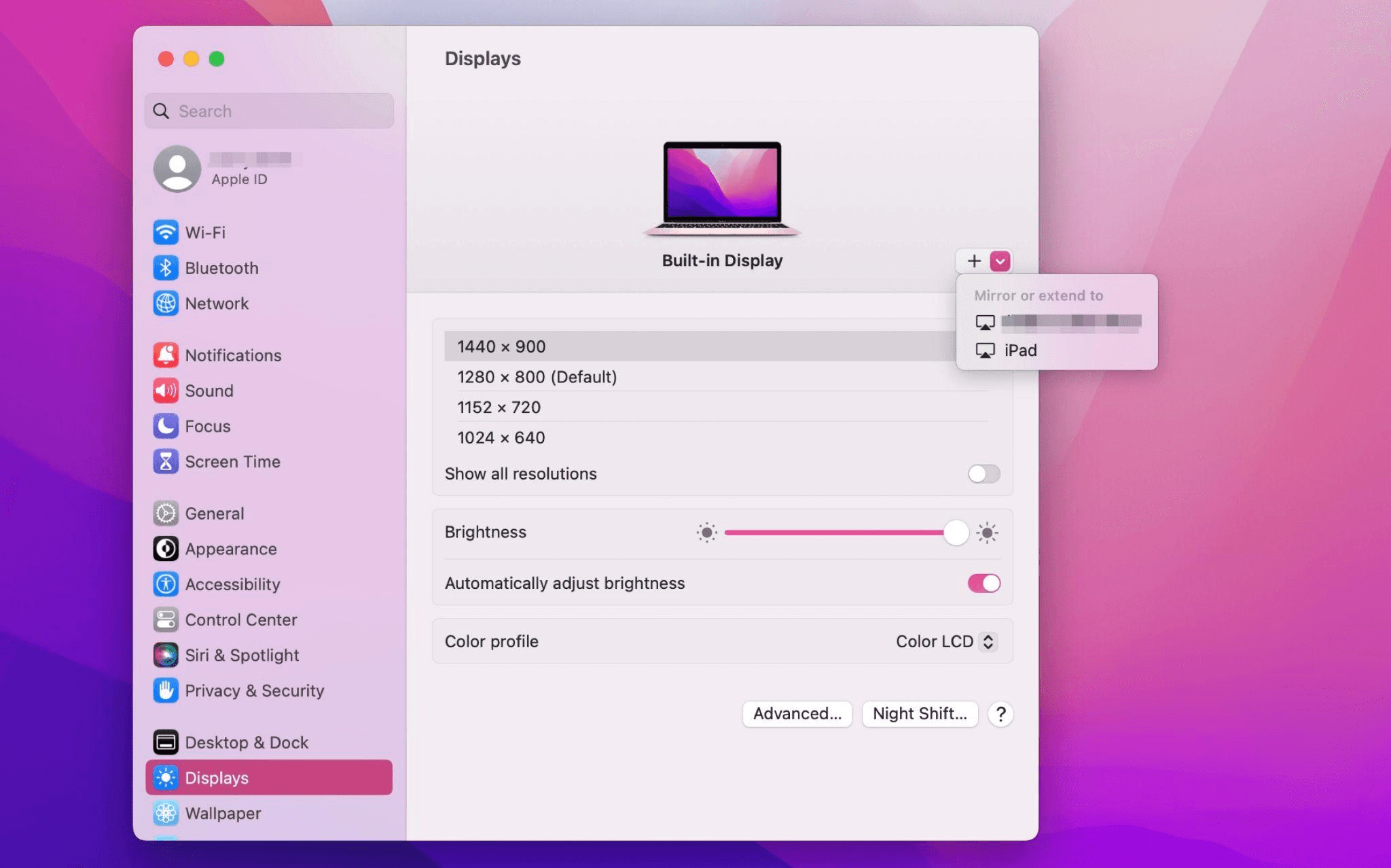
iPadを選択し、使用設定を「拡張ディスプレイ」に変更します。Macの上部ツールバーのAirplay設定を確認し、iPadを「別のディスプレイとして使用」に設定します。
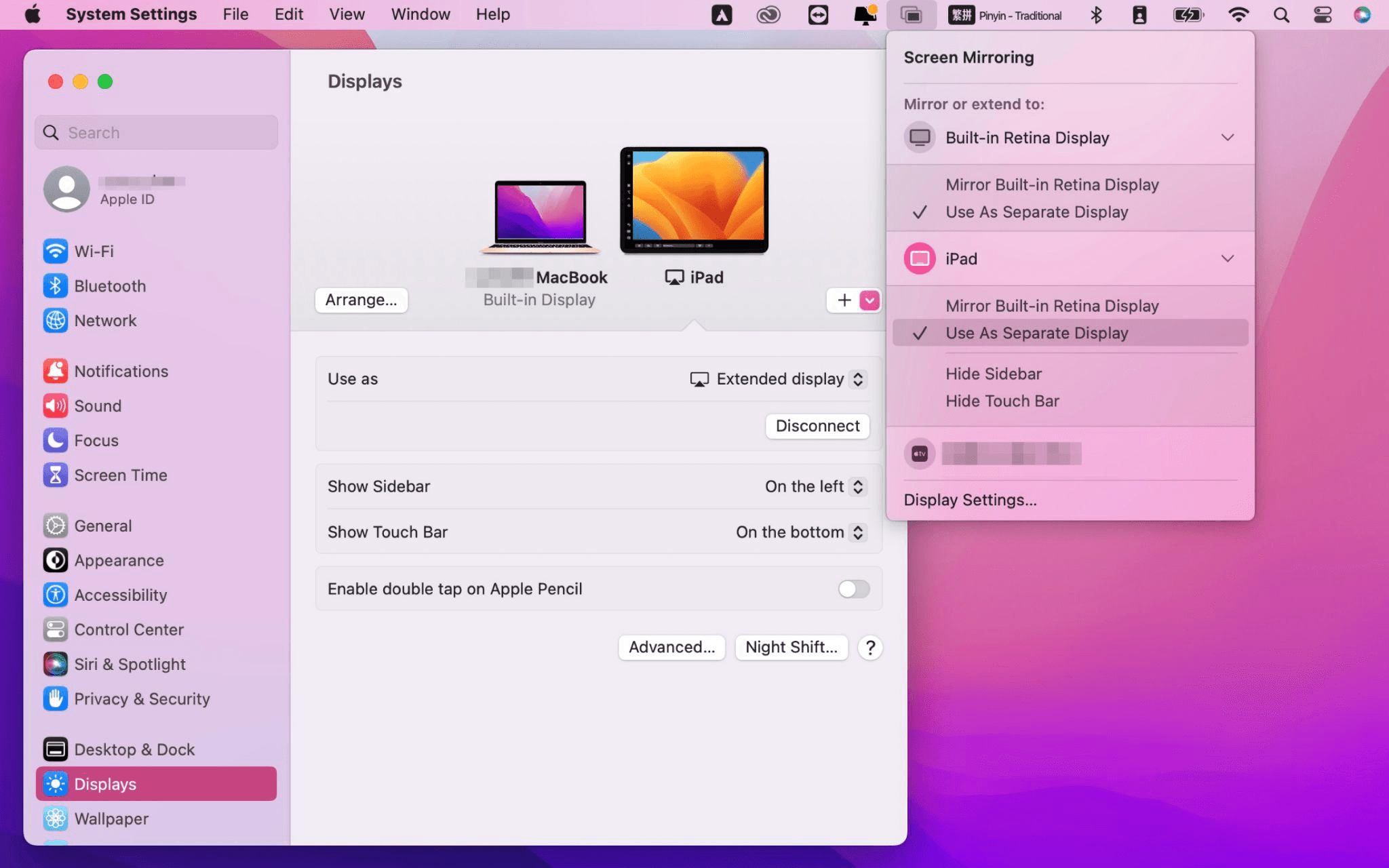
設定が完了すると、iPadがMacのセカンドディスプレイとなります。MacからiPadにウィンドウをスムーズにドラッグすることができます。また、iPadのサイドバーを使用したり、システムディスプレイ設定でサイドバーの位置を変更したりできます。
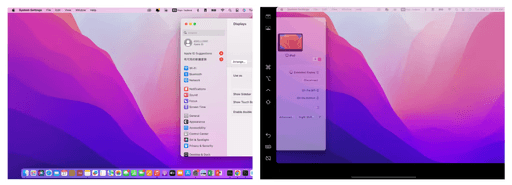
MacBookスクリーン(左)とiPadスクリーン(右)
Apple Sidecarは、2016年以降に発売されたMacとiPadOS13以上のみをサポートします。古いAppleデバイスやWindowsデバイスを使用している場合でも、DeskInリモートソフトウェアを利用して画面拡張を行うことができます。iPadをMacやWindowsのセカンドディスプレイとして使用でき、その滑らかさはSidecarに劣りません。
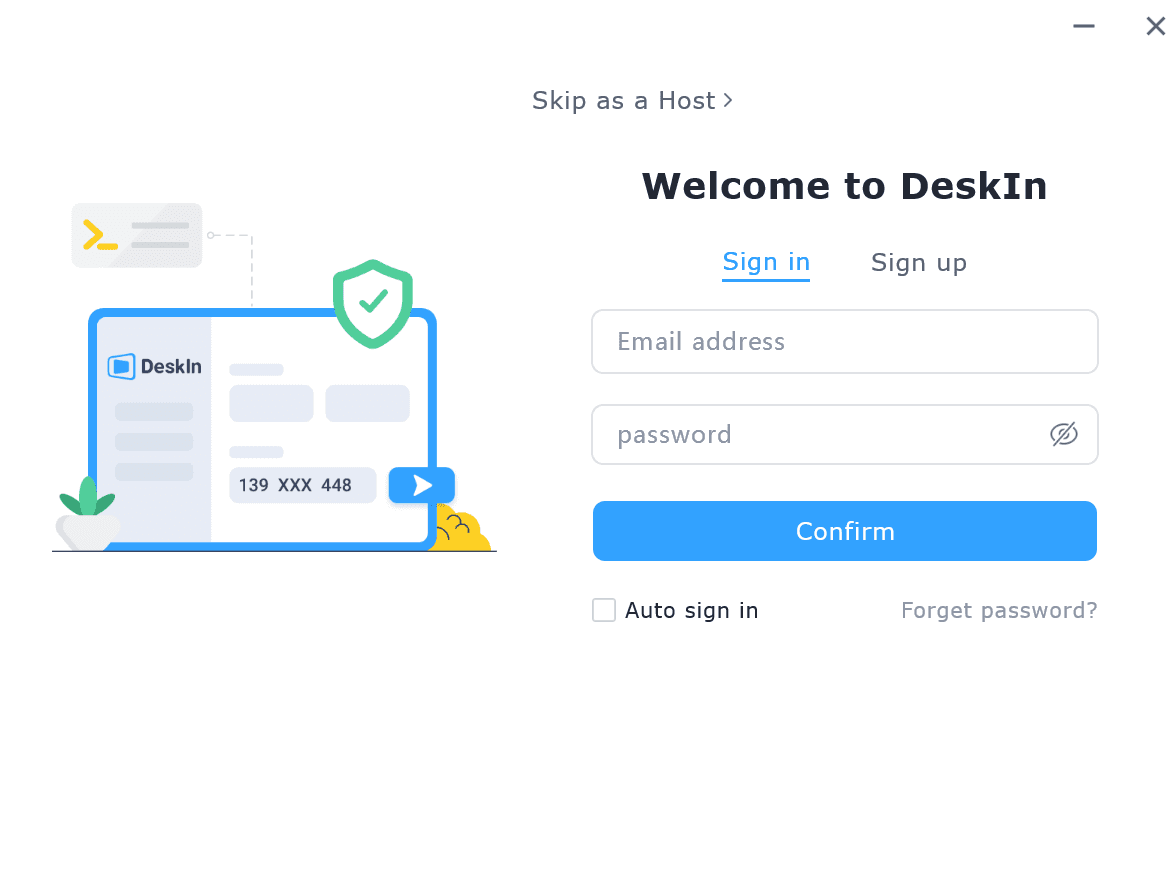
コンピューターとiPadにDeskInをダウンロードし、無料アカウントを登録して別々にログインします。

注意: 新しいデバイスに初めてログインする際には、アカウントのセキュリティを保護するためにメール認証を完了する必要があります。
Windows/MacコンピュータでDeskInアプリを開き、「スクリーン管理」タブに行き、「画面を拡張する」をクリックします。
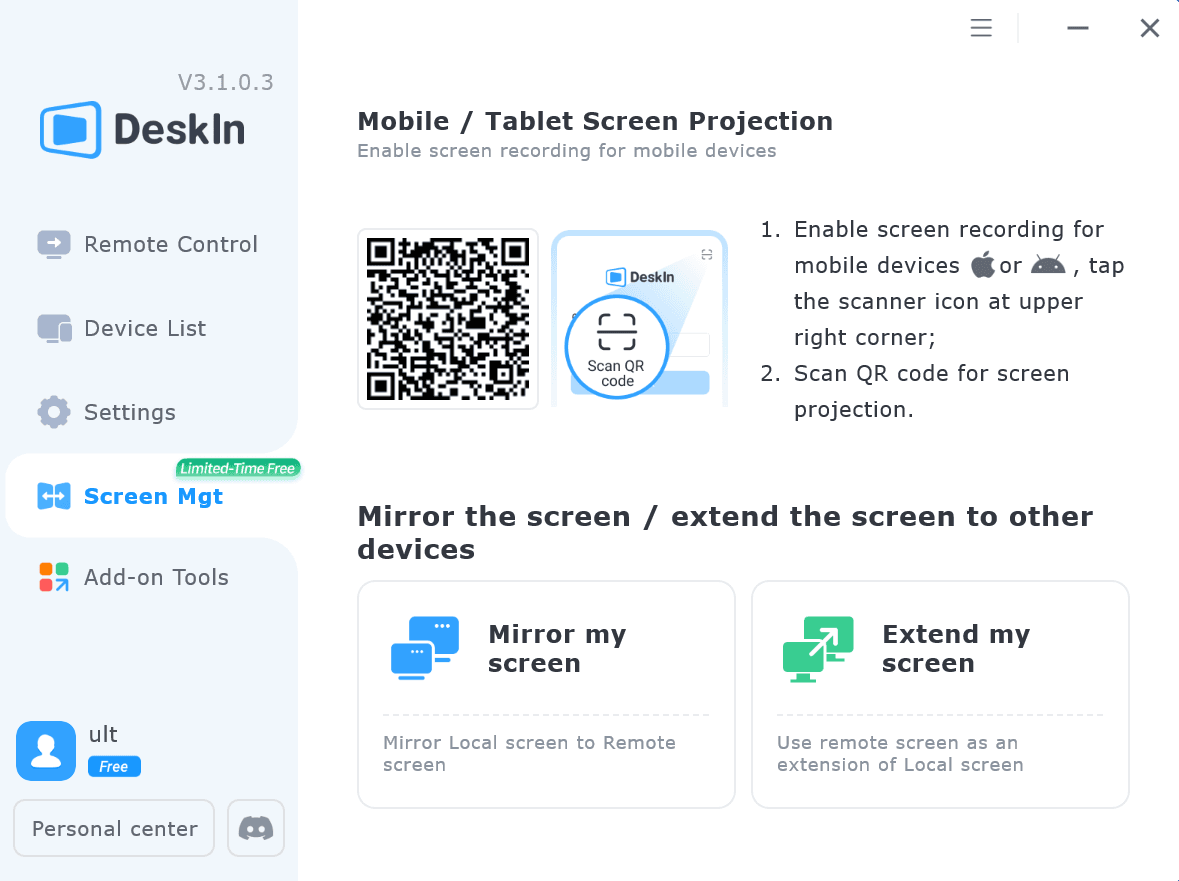
iPadを選択し、「拡張を開始」をクリックします。接続が完了すると、iPadはWindows/Macコンピューターのセカンドディスプレイとなり、2つのスクリーンを1つのもののようにウィンドウを移動できます。
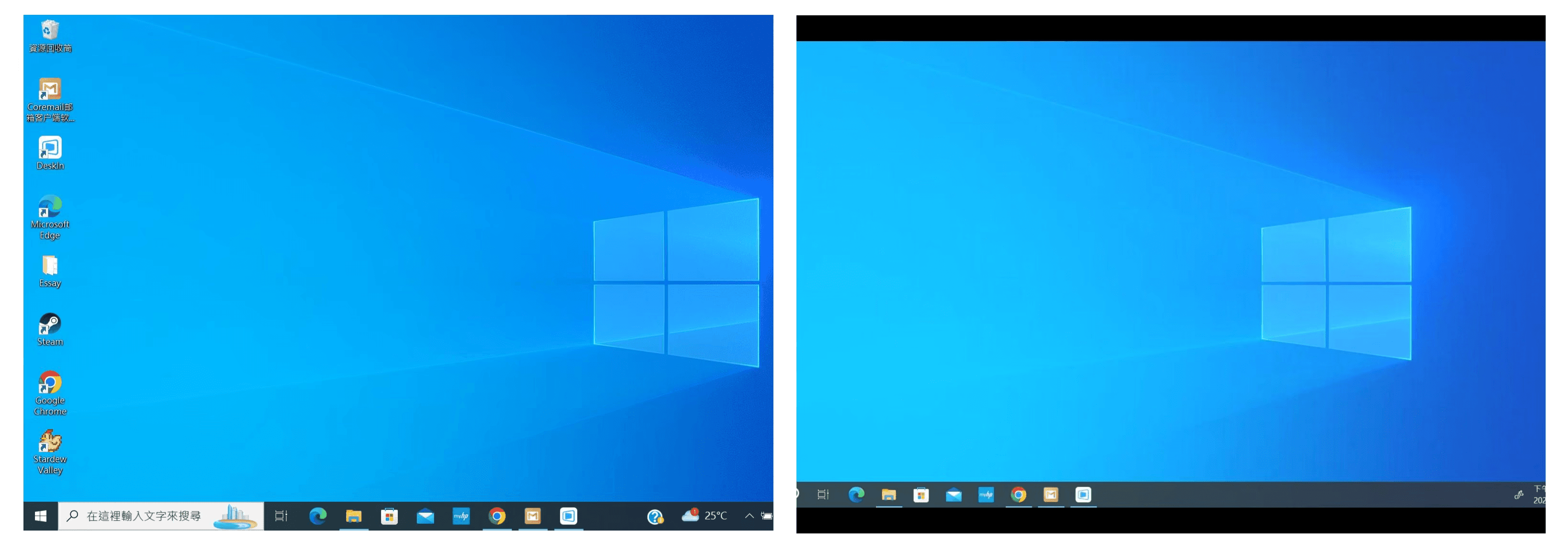
コンピュータスクリーン(左)とiPadスクリーン(右)
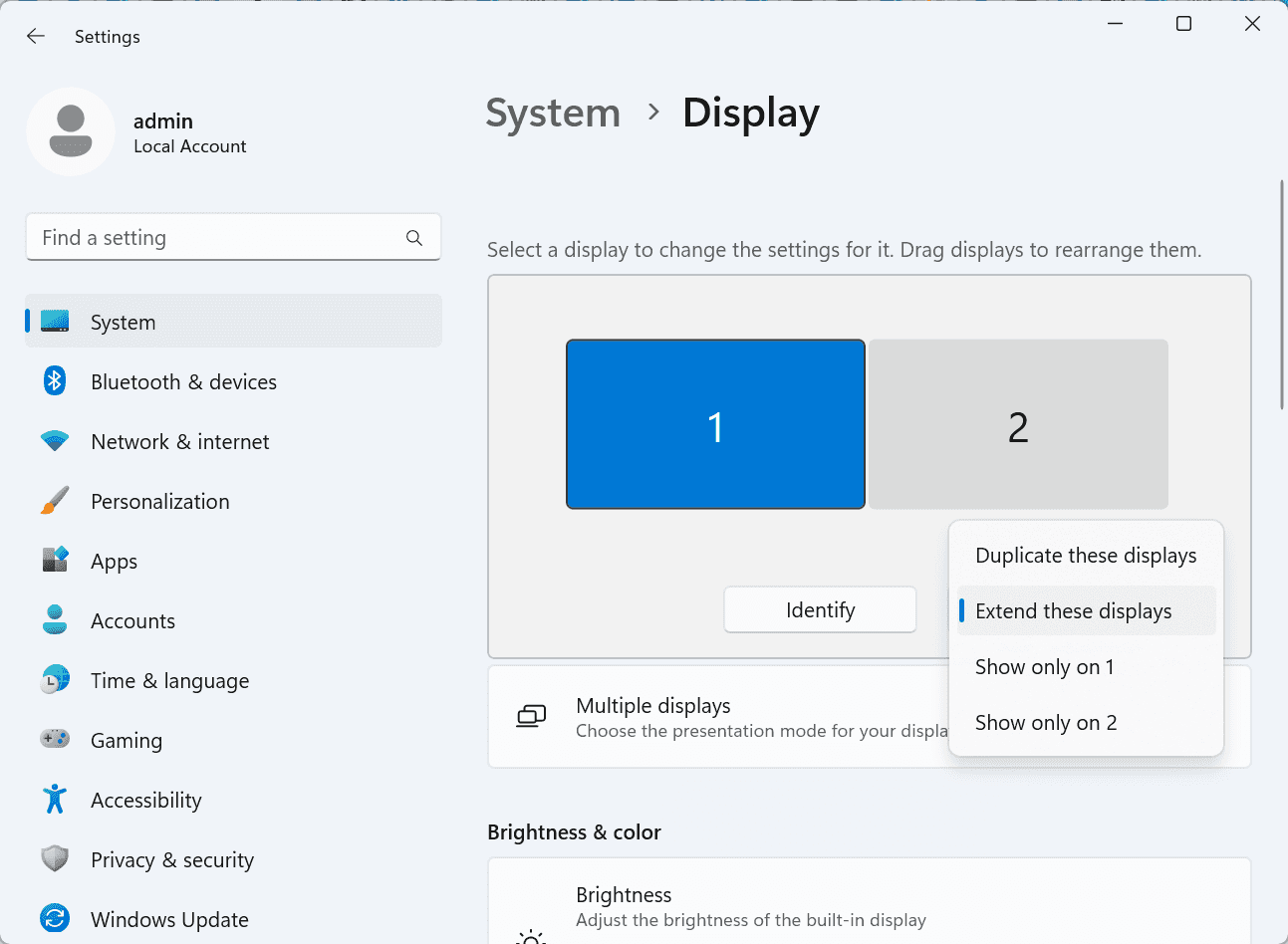
拡張後、iPadがコンピュータ画面の内容をミラーリングしているだけの場合はWindowsシステム設定 >>ディスプレイ設定に行き、「これらのディスプレイを拡張」を選択してください。2つの画面をドラッグして画面の位置を変更することもできます。
この記事では、DeskInリモートデスクトップソフトウェアを使用してiPadをMacおよびWindowsコンピューターの「セカンドスクリーン」にする方法を紹介します。これは、同時に複数のタスクを処理し、生産性を向上させたい方に特に有用です。MacBook、iPad、Androidタブレット、およびWindows PCで動作する画面拡張ツールを探している場合、DeskInリモートデスクトップは最適なソリューションです。DeskInをダウンロードして、ぜひお試しください!
How to Play MapleStory Classic World on Mac
A lot of the players who are most excited about MapleStory Classic World grew up on 2005-era MapleStory — and a large share of that generation now does its computing on a MacBook. Nexon clearly knows this: a native macOS client was on the feature list for the second Closed Online Test, which ran August 4–12, 2026, alongside Ossyria and third job advancement. But as of this writing, that Mac client is still in development, not publicly available, and there's still no confirmed public launch date for the game itself.
So if you want to play MapleStory Classic World on a Mac right now — or want a reliable plan for when the game does launch — you've got two real options: run Windows in a virtual machine, or use DeskIn remote desktop to control an actual Windows PC from your Mac. This guide covers both, including a login-conflict issue that catches a lot of virtual machine users off guard.
Not yet, publicly. Nexon's May 2026 roadmap update confirmed macOS support is in development, and it appeared as a testable feature in the second Closed Online Test. Windows PC remains the confirmed launch platform, and Nexon hasn't said whether the Mac client will be ready at launch or arrive afterward. The game hasn't had a full public release on any platform — Nexon has said one more test is planned before launch.
Given that, Mac players currently have two ways in: a Windows virtual machine, or remote desktop software that connects to a real Windows PC.
Classic World is exclusive to GMS (Global MapleStory), covering North America, Europe, and most other regions without a local Nexon partner. Markets with their own official MapleStory service — Korea, China, Japan, Taiwan/Hong Kong, and Southeast Asia — aren't GMS-eligible, so Mac players in those regions would need a VPN to reach Classic World, which isn't recommended. Whether NA and EU will run as separate worlds hasn't been confirmed.
Tools like Parallels Desktop or VMware Fusion let you run a full Windows install inside macOS, and then install MapleStory Classic World the way a Windows user would. It works, but it asks a lot of your Mac's hardware.
RAM: 16GB minimum recommended; 8GB is genuinely tight, since macOS and Windows are both running at once and macOS alone can eat most of that before Windows gets a share. For a comfortable setup with guides or Discord open on the side, aim for 32GB.
CPU/GPU: Virtual machines can't pass hardware through at 100%; graphics get software-emulated, which typically costs 20–30% of the performance you'd get on native Windows hardware.
Thermals: Running two full operating systems under load generates real heat, and laptop-class Macs with limited cooling can throttle during longer grinding sessions.
Apple Silicon translation overhead: M-series Macs can only run Windows on ARM in a VM. If Classic World ships as an x86/x64 build, it needs an extra translation layer to run at all, stacking on top of the virtualization overhead already mentioned.
Anti-cheat compatibility is a real unknown: the original MapleStory has historically been hostile to virtualized environments because of its anti-cheat system, and Nexon hasn't said how Classic World's anti-cheat will treat VMs. Treat virtualization as a maybe, not a guaranteed plan.
There's also the practical overhead: setting up a VM means downloading a Windows image, allocating dozens of gigabytes of disk space, installing display drivers, and — on Apple Silicon — dealing with ARM compatibility quirks that don't show up on a real x86 PC. Keyboard shortcuts can also conflict, since macOS system shortcuts (Control, Option, Command) don't always play nicely with a Windows game's default keybinds.
Instead of building a Windows environment inside your Mac, DeskIn lets you connect directly to a Windows PC you already have — your desktop at home, a work machine, or a spare laptop — and control it from your Mac in real time. The game runs on genuine Windows hardware the whole time, so there's no emulation tax, no ARM translation layer, and no anti-cheat guessing game.
A virtual machine makes sense if:
You don't have access to any Windows PC at all, so a Mac VM is your only option.
Your Mac has strong specs — 16GB+ RAM, ideally 32GB, and a higher-end M-series chip that can absorb the performance loss.
You're comfortable with a fairly technical setup process.
You rarely need to switch between devices, so the single-login limitation isn't a practical issue for you.
DeskIn makes more sense if:
You already have a Windows PC (or another Mac) that can run MapleStory Classic World, and you just want to reach it from your MacBook.
You're traveling or away from your desk often and want to pick up where you left off without re-downloading anything.
You don't want to deal with logging out of one device every time you switch to another.
Your Mac has more modest specs, and you'd rather not risk stutters, crashes, or a game that won't launch at all.
If you already own a Windows machine, DeskIn is generally the lower-effort, lower-risk choice. A VM is really a fallback for players with no Windows access and a Mac powerful enough to absorb the overhead.
Step 1: Set up the Windows PC. Install MapleStory Classic World on a Windows PC and create your character, then install DeskIn on that same PC, sign in, and enable unattended access with a connection password so you can reach it later without anyone at the keyboard.
Step 2: Install DeskIn on your Mac. Download the macOS version of DeskIn, sign in with the same account, and your Windows PC will appear in your device list.
Step 3: Connect. Select the PC, enter the connection password, and you'll get a live view of the Windows desktop that you control with your Mac's mouse and trackpad — the same session, the same login, no conflicts.
Step 4: Tune quality for your connection. On a stable connection, push quality up to enjoy Classic World's remastered pixel art in full detail; on the road, prioritize smoothness to cut down on input lag.
Step 5: Log in and play. Open the game inside the remote session and log in as usual — grinding, party quests, and shopping all work exactly as they would sitting at the PC directly.
Resolution and quality: Free-tier users should start around 720p/30fps for a stable baseline; paid-tier users can push up to 4K 60FPS or 2K 240FPS on a strong connection to get the most out of Classic World's art.
Screen scaling: If your Mac and Windows PC have very different display sizes, use DeskIn's automatic scaling option in the toolbar, or adjust the remote PC's resolution to match your Mac's screen more closely.
Keyboard and mouse mapping: DeskIn maps your Mac's keyboard directly to the remote PC. Turning on Game Mouse mode prevents the keyboard from getting locked mid-session.
Controller support: If Mac keyboard controls feel awkward, pair a controller to your Mac and enable controller mapping from the toolbar — DeskIn will pass those inputs straight through to the remote PC.
Simple Setup:No Windows installation required — connect and start playing within minutes.
Doesn't tax your Mac's hardware. All the actual computation happens on the remote Windows PC; your Mac just displays the stream and sends inputs.
Performance and compatibility match native Windows, because that's exactly what's running — no ARM translation layer to worry about.
No account login conflicts, since DeskIn connects to the same existing session instead of creating a new device.
Cross-device flexibility. The same account lets you connect from Mac, iPhone, iPad, or Android, and it's always the same underlying session — no juggling logins between devices.
Not publicly yet. Nexon has confirmed a macOS client is in development and tested it in the second Closed Online Test, but Windows remains the confirmed launch platform and no public Mac release has shipped.
Yes. DeskIn uses end-to-end encryption and two-factor login, and since you're remotely operating a PC you already control, your credentials never pass through a third party.
Technically you can install one, but the experience will be rough. With 8GB split between macOS and Windows, there's very little left over for Windows, and stutters or crashes become likely during longer sessions. DeskIn is the more stable option here, since the remote PC handles all the processing — your Mac's RAM isn't a bottleneck.
Real-world performance depends on both ends' network quality, but since DeskIn connects to native Windows hardware with no virtualization overhead, and its low-latency streaming keeps end-to-end delay under 40ms on a good connection, it typically feels smoother than a resource-constrained VM.
No. DeskIn controls the same PC and the same already-active session rather than logging in as a new device, so it doesn't trigger MapleStory's single-session login limit — this is exactly the conflict that trips up VM users switching between two separate Windows installs.
DeskIn needs a Windows (or other supported platform) machine to connect to. If you don't have one, consider borrowing access to a friend's or family member's PC, or renting a cloud Windows machine as your connection target.
DeskIn supports Windows, macOS, iOS, and Android. A Mac can connect to a Windows PC, and a Windows PC can just as easily connect to and control a Mac.
MapleStory Classic World doesn't have a public Mac client yet, but that doesn't mean Mac players have to gamble on a resource-hungry virtual machine and hope the anti-cheat cooperates. If you already have access to a Windows PC that can run the game — or even another Mac — connecting to it through DeskIn gets you native Windows performance, none of the virtualization overhead, and none of the account-login headaches that come with running a second "device." Set it up once, and you'll be ready to log in the moment Classic World opens its doors.
How to Play MapleStory Classic World on Mobile Before the Official App Arrives
MapleStory Classic World has turned into one of the most-searched topics in the MapleStory community this year. Nexon's pre-Big Bang server pulled in roughly 5,000 players for its first Closed Online Test back in April 2026, and thousands more signed up for the second test that ran August 4–12, 2026. With Ossyria, third job advancement, and controller support now confirmed, interest has never been higher — and a lot of that interest is coming from players who want to know one thing: can you play MapleStory Classic World on your phone?
Short answer: not with an official app, not yet. This guide breaks down exactly what Nexon has confirmed about platforms so far, then walks through how DeskIn remote desktop lets you play MapleStory Classic World on mobile right now, without waiting on an app that hasn't been announced.
As of this writing, Nexon has not announced a mobile or console version of MapleStory Classic World. The confirmed platforms are Windows PC and macOS — macOS support was specifically added as a testable feature during the second Closed Online Test in August 2026, alongside Ossyria and third job advancement, but it's still listed as "in development" rather than publicly available.
There's also no full public launch date yet. Nexon has run two Closed Online Tests so far and has said one more test is planned before release, so most community trackers currently estimate a launch window in late 2026 or early 2027 — but that's community speculation, not an official date.
Put simply: if you want to play MapleStory Classic World on a phone or tablet today, a native app isn't an option. The only practical route is streaming the PC version from a Windows machine you already have access to.
Classic World is exclusive to GMS (Global MapleStory), Nexon's English-language service for North America, Europe, and most other regions without a local Nexon partner. Players in markets with their own official MapleStory service — Korea, China, Japan, Taiwan/Hong Kong, and Southeast Asia — aren't eligible for GMS accounts, so Classic World isn't accessible there without a VPN, which isn't recommended. It's not yet confirmed whether NA and EU will run as separate worlds within Classic World.
DeskIn is a cross-platform remote desktop app built specifically with PC gaming in mind, and it maps well onto exactly the problem MapleStory Classic World mobile players are trying to solve.
Stable, low-latency connections. DeskIn's ZeroSync® engine keeps end-to-end latency under 40ms on a good connection and automatically reroutes around congested paths, so grinding, dodging, and skill combos in Classic World's classic-era combat don't feel delayed.
Up to 4K 60FPS / 2K 240FPS streaming. Classic World's remastered pixel art holds up well when it isn't compressed into mush — DeskIn's streaming keeps text and sprites sharp even on a phone screen.
You're connecting to your own PC, not emulating one. DeskIn doesn't run Windows inside your phone; it streams the display of a Windows computer you control and sends your inputs back in real time. That means full compatibility and full performance — no emulation layer to fight with.
End-to-end encryption and two-factor login. Sessions are encrypted end-to-end, and you can set an allowlist of authorized devices, so only you can connect to your own PC.
Flexible, per-character keybinds. Classic World's Warrior, Magician, Bowman, and Thief classes each use very different skill layouts. DeskIn's on-screen game keyboard lets you build a custom key layout and save it as its own profile, so you can switch between characters without re-mapping keys every time.
Built-in virtual mouse. In pointer mode, DeskIn adds virtual left/right mouse buttons over the stream, which makes precise UI clicks — inventory, cash shop, trade windows — far easier than tapping blindly on a touchscreen.
Once you're connected, mobile play through DeskIn covers pretty much everything you'd do sitting at your PC:
Daily quests and login rewards — knock these out on your commute instead of waiting until you're home.
Cash shop browsing — scroll and preview cosmetics with touch gestures just like any shopping app.
Grinding and leveling — use the virtual directional pad and skill-key layout to keep training in familiar maps.
Party quests — latency low enough to keep up with a party's pacing on runs like Kerning City PQ.
Trading and the marketplace — check prices and list items using the virtual mouse for precise clicks.
Guild chat and messaging — reply to your guild or party the moment something comes up.
Step 1: Set up DeskIn on the Windows PC running Classic World. Install DeskIn on the PC where you've registered for testing (or where the game is installed once it launches), sign in, and turn on unattended access so the PC can be reached without anyone sitting in front of it.
Step 2: Install the DeskIn app on your phone. Download DeskIn from the App Store or Google Play, sign in with the same account, and your PC will show up in the device list.
Step 3: Connect and switch to pointer mode. Tap your PC to connect, then switch the control mode from touch to pointer — this unlocks the customizable virtual keyboard and virtual mouse.
Step 4: Browsing the cash shop. Drag to move the cursor and tap the virtual mouse buttons to click through menus and item previews, exactly like using a mouse on a desktop.
Step 5: Grinding. Open the game keyboard menu, build a layout with your movement keys and skill keys, and save it as a profile. Pull it up any time you start a grinding session.
Step 6: Pick the right streaming quality for your connection. On mobile data, prioritize smoothness over resolution to cut down on input delay; on Wi-Fi, bump the quality up to enjoy Classic World's remastered art at full clarity.
A tablet's bigger screen is a natural fit for content that needs either more reading room or more precision — daily quest text and boss encounters both qualify.
Step 1: Same setup as mobile. Install DeskIn on your iPad or Android tablet and sign in — connection steps are identical to the phone app.
Step 2: Daily quests. The larger display makes quest text, item descriptions, and map markers easier to read at a glance, so you're less likely to misread an objective mid-run.
Step 3: Boss fights. Bosses demand precise dodges and timing that touch controls alone can struggle with — pair your tablet with a Bluetooth keyboard and mouse, or a controller (see below), instead of relying on the virtual keyboard.
Step 4: Bump the frame rate for boss content. Choose a higher refresh setting in DeskIn's connection options so skill telegraphs and boss patterns read clearly in real time.
Step 5: Use split-screen for guide lookups. Run DeskIn alongside a browser or notes app in split view to check attack patterns without leaving the fight.
If virtual buttons don't feel precise enough, DeskIn supports Bluetooth controllers, including Xbox, PlayStation, and several third-party pads.
Step 1: Pair the controller with your phone. Use your phone's Bluetooth settings to pair the controller first.
Step 2: Connect through DeskIn. Once connected to your PC, DeskIn automatically detects the paired controller — no extra driver install needed.
Step 3: Test your inputs. Head into a training map first and confirm movement, attacks, and skills map to the buttons you expect before jumping into content that matters.
Step 4: Favor smoothness for fast-paced play. When you're actively grinding or fighting with a controller, prioritize DeskIn's smoothness setting over max resolution for the most responsive feel.
Running a Warrior and a Bowman means running two very different skill bars. Here's how to keep them separate in DeskIn instead of re-mapping keys every login:
Step 1: Switch to pointer mode and open the game keyboard menu. After connecting, switch to pointer mode and open DeskIn's game keyboard settings.
Step 2: Create a new keyboard layout. Tap "New Keyboard" and add your movement pad, skill keys, and item keys to match your current character's build.
Step 3: Name it by character or class. Label the layout something identifiable — "Bowman" or "Main Warrior" — and save it.
Step 4: Load the right profile when you switch characters. Before logging into a different character, select its saved layout from the game keyboard menu instead of rebuilding it from scratch.
Step 5: Update layouts as skills change. When a class gets rebalanced or you unlock new skills after a job advancement, go back into that profile and add the new keys.
No. Nexon has not announced a mobile or console version. Confirmed platforms are Windows, with a macOS client currently in development.
Nexon hasn't announced a public release date. Two Closed Online Tests have run so far (April 16–24 and August 4–12, 2026), with one more test planned before launch. Community estimates point to late 2026 or early 2027, but that isn't official.
No. DeskIn remotely operates your own PC and sends the same mouse and keyboard input you'd normally use — it isn't a macro, bot, or memory-editing tool, so it doesn't behave like the automation that anti-cheat systems are built to catch.
DeskIn's low-latency streaming keeps things playable on a stable connection, generally noticeably smoother than trying to force a browser workaround. Real-world latency still depends on both ends' network quality, so Wi-Fi is recommended over cellular when possible.
For checking dailies or browsing the shop occasionally, the free plan typically covers it. If you plan to grind for long sessions, use a controller regularly, or manage several devices, a paid plan unlocks higher streaming quality and additional features.
Setup and connection steps are identical. The difference is screen size — phones are handy for quick, single-hand tasks like dailies and the shop, while tablets are better suited to boss fights and content where you want a controller or external keyboard.
Until Nexon ships a mobile client — if one ever gets announced — DeskIn is the most practical way to keep playing MapleStory Classic World away from your desk. Install it on both your gaming PC and your phone or tablet, set up a keybind profile per character, and you can knock out dailies, grind, and even tackle boss fights without being tied to a monitor.
連絡先
メール: support@deskin.io
オフィスの住所:
991D Alexandra Road #02-17
シンガポール 119972
著作権 © 2026 Zuler Technology PTE. LTD. 無断複写・転載を禁じます。
お問い合わせ
Eメール: support@deskin.io
本社: 991D Alexandra Road #02-17, シンガポール 119972
著作権 © 2026 Zuler Technology PTE. LTD. 無断複写・転載を禁じます。
連絡先
support@deskin.io
991D Alexandra Road #02-17
シンガポール 119972
著作権 © 2026 Zuler Technology PTE. LTD. 無断複写・転載を禁じます。


